> For the complete documentation index, see [llms.txt](https://docs.guestway.io/llms.txt). Markdown versions of documentation pages are available by appending `.md` to page URLs; this page is available as [Markdown](https://docs.guestway.io/reservations-and-operations/room-assignment.md).
# Room assignment
Room assignment picks a free room of the booked type for each reservation, by rules you set, and sends it to your PMS.
{% hint style="info" %}
**Requirements**
* The room assignment read permission to view configurations. Admins and operators can create, edit and delete them.
* A connected PMS with room types.
{% endhint %}
## Configuration
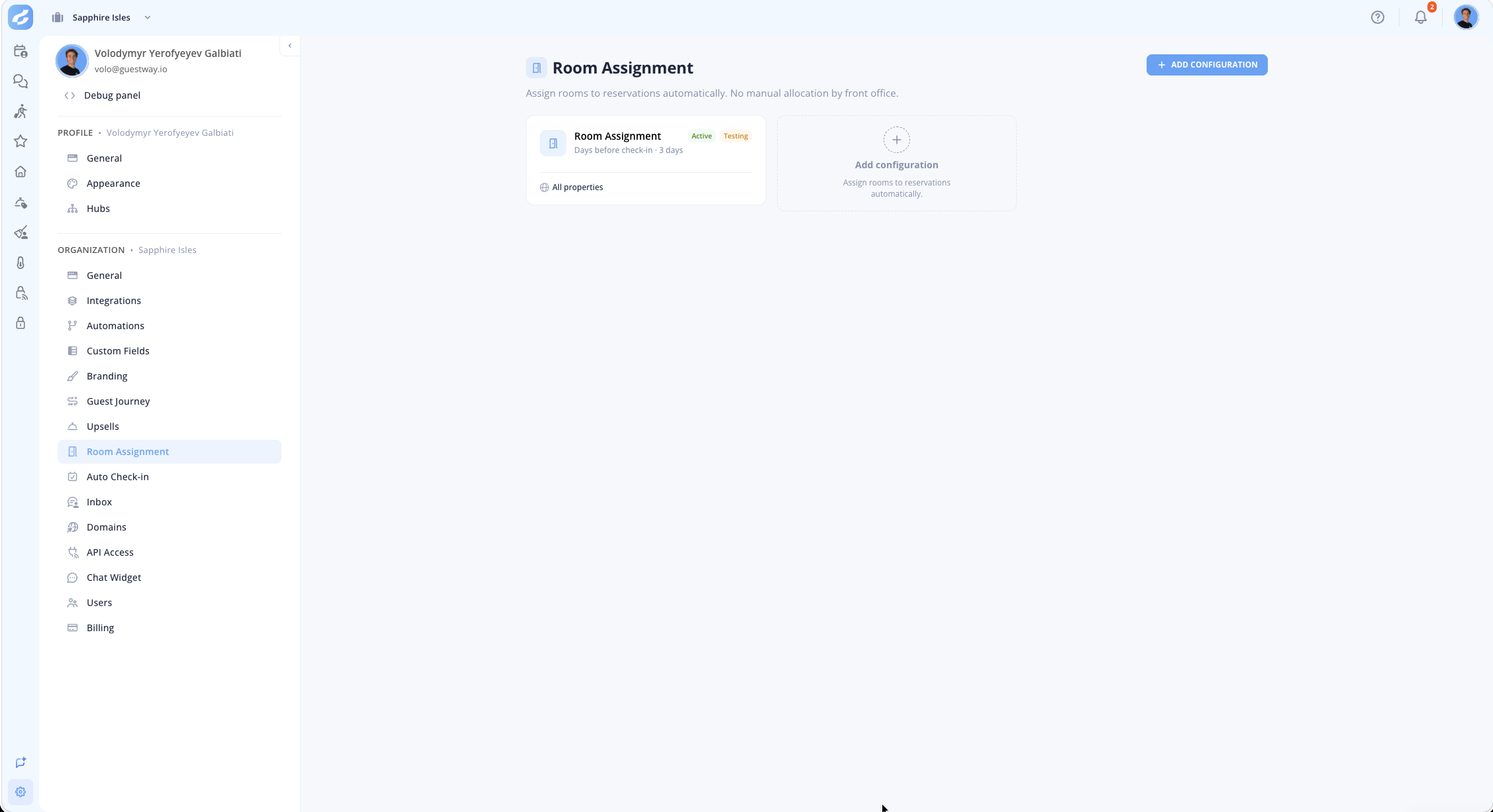
**Room Assignment** is in **Settings**. Each configuration is a card with its **Name**, an **Active** or **Off** badge, a **Testing** badge in testing mode, when the assignment happens and the properties it covers.
The Room Assignment settings page view.
| Field | What it does | Limits |
| ---------------------- | --------------------------------------------------------------- | ------------------------------------------------------------------------------------------------------------------------------------------- |
| **Name** | The name of the configuration. | Required. |
| **Where this applies** | All properties, or specific complexes, multi-units or listings. | Each property or room type belongs to one configuration. The most specific configuration wins: room type, then property, then organization. |
| **Enabled** | Turns the configuration on. When off, the card shows **Off**. | None |
| **Testing mode** | Runs the assignment without sending the unit to the PMS. | None |
## Assignment trigger
| Option | When the room is assigned | Limits |
| ---------------------------- | ---------------------------------------------------------------------------------------------------------------------------------------------- | ------------------------------ |
| **On booking confirmation** | Immediately when the reservation is confirmed. | None |
| **Days before check-in** | A set number of days before the check-in date. | 1 to 365 days. |
| **On check-in day** | A set number of hours before the allowed check-in time. | 0 to 24 hours. |
| **Wait until unit is clean** | Holds the assignment until housekeeping marks the unit clean. While waiting, reservations with the earliest check-in times are assigned first. | Only with **On check-in day**. |
## Assignment logic
The steps run top to bottom.
| Step | What it does | Limits |
| ------------------------------ | --------------------------------------------------------------------------------------------------------------------------------------------------------------------------------------------------------------------------------- | --------------------------------------------- |
| **Early check-in requirement** | A reservation with a booked early check-in is always assigned a ready unit first. | **Always first**. |
| **Cleaning time needed** | Prefers units with enough time for housekeeping between guests: the **Preferred minimum cleaning time**. Units with enough time all count as an equal fit. Without such a unit, Guestway picks the unit with the most empty time. | 1 to 12 hours. A preference, never a blocker. |
| **Placement strategy** | How a free unit is chosen after the steps above. | See below. |
| Placement strategy | What it does |
| -------------------------- | --------------------------------------------------------------------------------------------------------------- |
| **Best fit** (Recommended) | The unit where the stay fits most tightly between bookings, leaving the fewest empty nights. |
| **Least recently used** | The unit with the oldest last assignment is filled first, never-used units first. Evens out usage across units. |
| **Completely random** | Any available unit of the matching type. |
## What is always respected
* Booked rooms, and rooms blocked in your PMS (out of order, maintenance), are never chosen.
* Rooms already sent to the PMS but not confirmed yet are counted, so two guests never get the same room.
* Reservations that already have a room, for example one assigned by hand in the PMS, are left alone. Guestway never overwrites a room.
* Assignment runs again when the dates, unit type or party size of a reservation change before a room is assigned.
A reservation is picked up when it is confirmed (not cancelled, not a confirmed no-show), booked on a room type without a room, has a check-in date of today or later, and belongs to a property and room type of an enabled configuration.
Changes to a configuration apply to reservations picked up after the change. When a configuration is deleted, its properties fall back to the next configuration that covers them.
## Activity messages
Guestway posts short messages in the conversation of the reservation. A click on a message shows the configuration, the room, when the reservation was queued, when the assignment started and ended, and any error of the PMS.
| Message | Meaning |
| --------------------------- | ------------------------------------------------------------------------------------------------------------------------------ |
| **Room assignment started** | Guestway is looking, but could not place the guest yet, for example because all rooms are taken or not clean. It keeps trying. |
| **Room assigned** | A room was chosen and sent to the PMS. In testing mode, it is marked **Testing**, and nothing was sent. |
| **Room assignment failed** | The PMS did not accept the room. The conversation is flagged. |
The started and assigned messages do not mark the conversation as needing a reply.
## Related
* [How to set up automatic room assignment](/reservations-and-operations/room-assignment/how-to-set-up-automatic-room-assignment.md)
* [About room assignment](/reservations-and-operations/room-assignment/about-room-assignment.md)
* [Multi-calendar](/reservations-and-operations/multi-calendar.md): assigned and unassigned reservations.
---
# Agent Instructions
This documentation is published with GitBook. GitBook is the documentation platform designed so that both humans and AI agents can read, navigate, and reason over technical content effectively. Learn more at gitbook.com.
## Querying This Documentation
If you need additional information that is not directly available in this page, you can query the documentation by asking a question.
Perform an HTTP GET request on the following URL with the `ask` and `goal` query parameters:
```
GET https://docs.guestway.io/reservations-and-operations/room-assignment.md?ask=&goal=
```
`ask` is the immediate question: it should be specific, self-contained, and written in natural language.
`goal` is what the user is ultimately trying to achieve, the reason they need the answer. Sharing it helps GitBook give you a better, more relevant answer. A goal is most helpful when it describes the outcome the user wants rather than restating the question. For example, with `ask=how do I create an API token`, a goal like `automate deployments from our CI pipeline` lets GitBook tailor the answer to that use case.
The response will contain a direct answer to the question and relevant excerpts and sources from the documentation.
Use this mechanism when the answer is not explicitly present in the current page, you need clarification or additional context, or you want to retrieve related documentation sections.