> For the complete documentation index, see [llms.txt](https://docs.guestway.io/llms.txt). Markdown versions of documentation pages are available by appending `.md` to page URLs; this page is available as [Markdown](https://docs.guestway.io/reservations-and-operations/multi-calendar.md).
# Multi-calendar
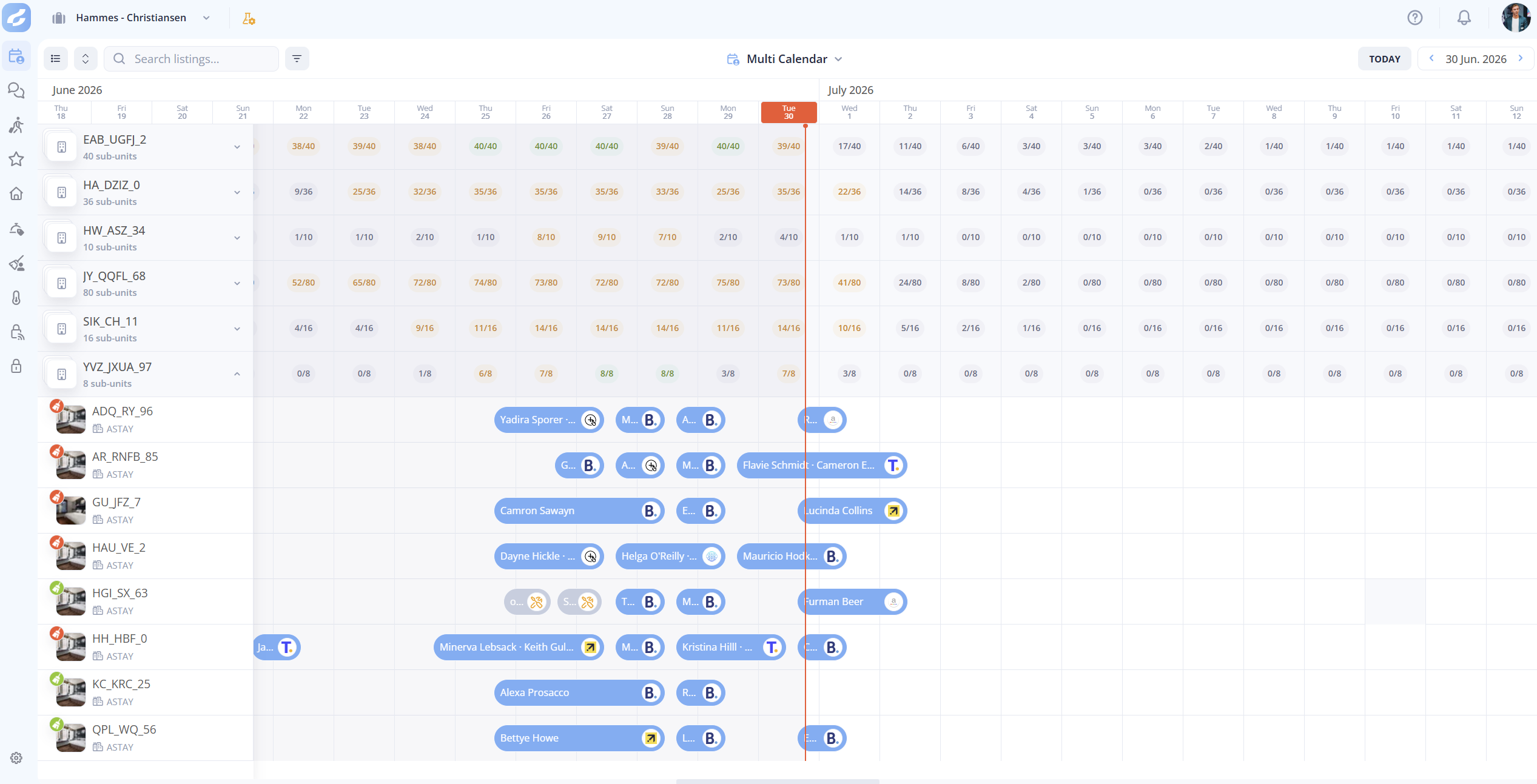
The multi-calendar shows every listing, reservation and cleaning status of your portfolio on one timeline.
## Calendar view
**Multi-Calendar** is in the left sidebar. Each row is a listing, and each column is a date. **Today** is highlighted. Reservations are colored blocks from check-in to check-out. Calendar blocks show nights that are blocked.
| Element | What it shows |
| ----------------- | ----------------------------------------------------------------------------------------------------------------- |
| Listing name | On hover: the address, the apartment, the floor, the guest capacity, and the Wi-Fi network and password. |
| Reservation block | On hover: the guest name, the stay dates, the booking channel, who booked it (**Booked by**) and the **Balance**. |
## Cleaning status indicators
Each listing row has a broom icon with the cleaning state of the unit:
| Icon | Meaning |
| ----------- | ------------------------------------------------ |
| Green broom | The unit is clean and ready for guests. |
| Red broom | The unit needs cleaning before the next arrival. |
## Reservation side panel
A click on a reservation block opens a side panel on the right.
| Area | What it shows |
| ----------------- | ----------------------------------------------------------- |
| Guest information | The name, contact details and guest count. |
| Stay details | The check-in and check-out dates, and the number of nights. |
| Payments | The payout breakdown and the balance status. |
| Access codes | The smart lock or static lock codes of the booking. |
| Cleaning tasks | The cleaning team and the task status. |
| Messages | The latest messages with the guest. |
From the panel, you can open the conversation in the [Unified AI inbox](/inbox-and-messaging/unified-ai-inbox.md), preview the [guest portal](/guest-experience/guest-portal.md) of the reservation, and open the reservation in your PMS.
## Search and filters
The search bar (**Search listings…**) filters the listings by property name, listing nickname, city or ZIP code.
## Multi-unit listings
Multi-unit listings are grouped. A group can be collapsed to one row, or expanded to one row per unit.
On the multi-unit row, each day shows a **booked / total** count: how many units are taken that night, out of how many there are. The count is emphasised as the night fills up, and stands out when the group is fully booked. A hover on a count shows the **Occupancy breakdown**:
| Row | What it means |
| -------------- | -------------------------------------------------------------------- |
| **Assigned** | Reservations already allocated to a specific unit. |
| **Unassigned** | Reservations held on the multi-unit but not allocated to a unit yet. |
An unassigned reservation counts as booked, but it has no unit yet, so it has no access codes and no cleaning task.
## Related
* [How to group multi-unit listings in the calendar](/reservations-and-operations/multi-calendar/how-to-group-multi-unit-listings-in-the-calendar.md)
* [Reservations](/reservations-and-operations/reservations.md): all reservations in a list.
* [Cleaning](/reservations-and-operations/cleaning.md)
* [Room assignment](/reservations-and-operations/room-assignment.md): allocate units automatically.
---
# Agent Instructions
This documentation is published with GitBook. GitBook is the documentation platform designed so that both humans and AI agents can read, navigate, and reason over technical content effectively. Learn more at gitbook.com.
## Querying This Documentation
If you need additional information that is not directly available in this page, you can query the documentation by asking a question.
Perform an HTTP GET request on the following URL with the `ask` and `goal` query parameters:
```
GET https://docs.guestway.io/reservations-and-operations/multi-calendar.md?ask=&goal=
```
`ask` is the immediate question: it should be specific, self-contained, and written in natural language.
`goal` is what the user is ultimately trying to achieve, the reason they need the answer. Sharing it helps GitBook give you a better, more relevant answer. A goal is most helpful when it describes the outcome the user wants rather than restating the question. For example, with `ask=how do I create an API token`, a goal like `automate deployments from our CI pipeline` lets GitBook tailor the answer to that use case.
The response will contain a direct answer to the question and relevant excerpts and sources from the documentation.
Use this mechanism when the answer is not explicitly present in the current page, you need clarification or additional context, or you want to retrieve related documentation sections.