> For the complete documentation index, see [llms.txt](https://docs.guestway.io/llms.txt). Markdown versions of documentation pages are available by appending `.md` to page URLs; this page is available as [Markdown](https://docs.guestway.io/reservations-and-operations/automations/how-to-export-and-import-schedules.md).
# How to export and import schedules
This guide shows you how to copy the schedules of one automation to another, also in another organization of your holding.
{% hint style="info" %}
**Before you start**
* The source automation and the destination automation both exist.
* To copy to another organization, both organizations are in your [holding](https://docs.guestway.io/account-and-administration/holding-settings.md).
{% endhint %}
## Export the schedules
{% stepper %}
{% step %}
### Open the source automation
Open the automation whose schedules you want to copy.
{% endstep %}
{% step %}
### Copy the schedules
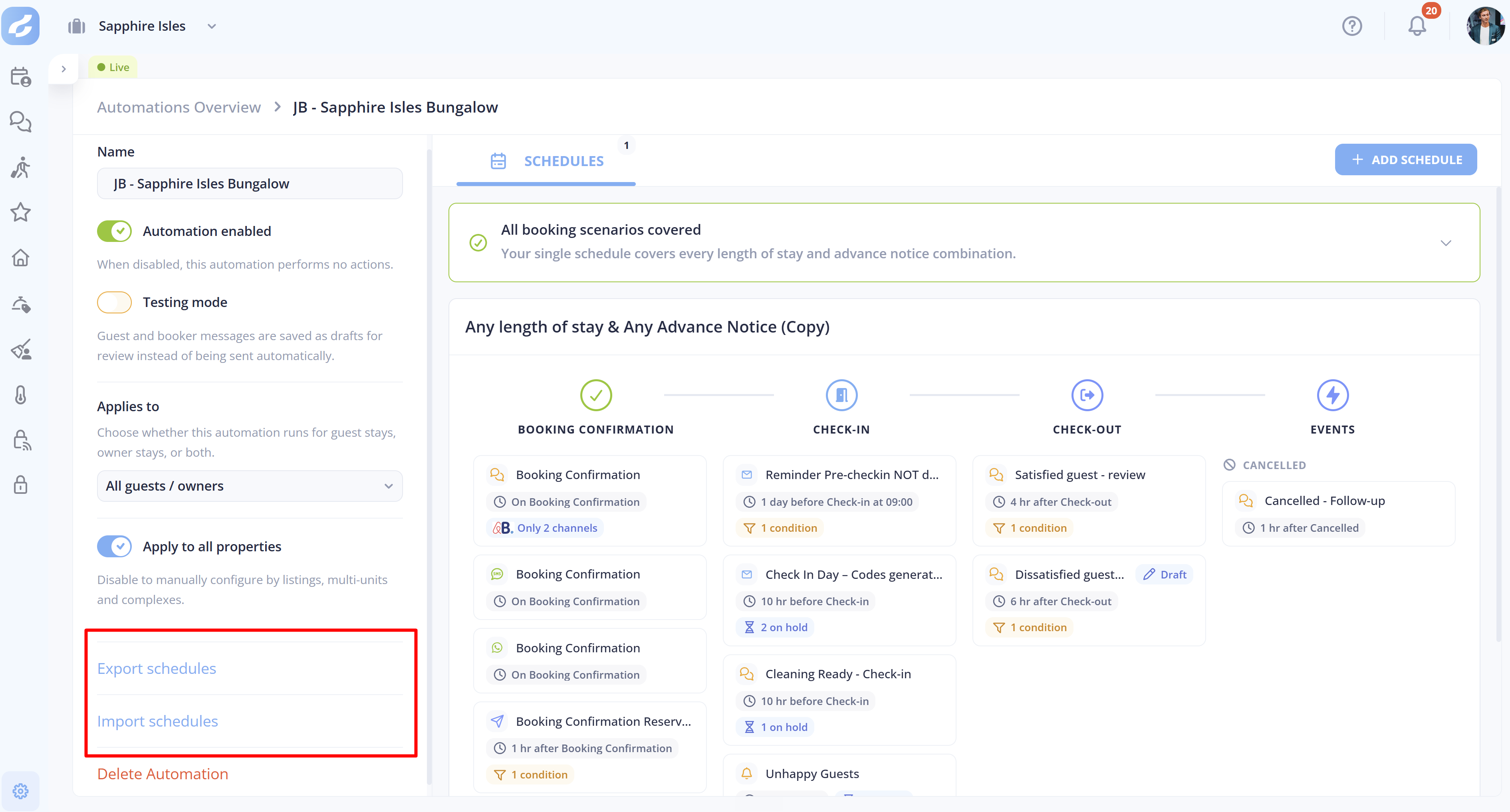
Click **Export schedules** in the left sidebar, below **Apply to all properties**. All schedules of the automation are copied as JSON, ready to paste.
{% endstep %}
{% endstepper %}
## Import the schedules
{% hint style="warning" %}
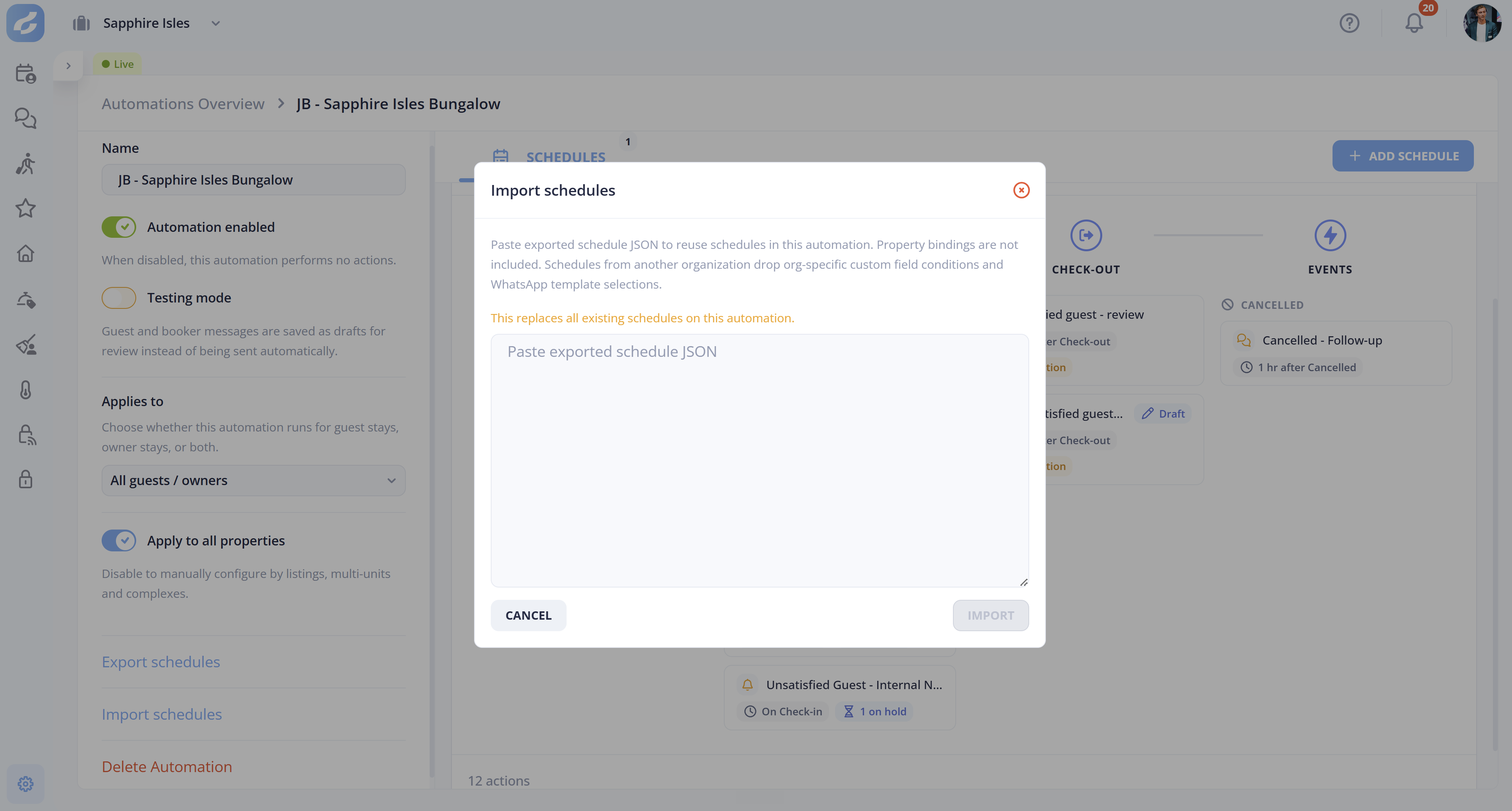
Importing replaces every schedule that is already in the destination automation. It does not add to them.
{% endhint %}
{% stepper %}
{% step %}
### Open the destination automation
Open the automation that must get the schedules.
{% endstep %}
{% step %}
### Paste the schedules
Click **Import schedules** in the left sidebar, and paste the exported JSON.
{% endstep %}
{% step %}
### Review the result
Check the imported schedules, and read what Guestway reports as removed. See [Fix what was removed](#fix-what-was-removed).
{% endstep %}
{% step %}
### Check the properties
The destination keeps its own name, **Applies to** setting and properties. Make sure that it points at the right properties.
{% endstep %}
{% step %}
### Save the automation
Save the automation to keep the imported schedules.
If you imported into the wrong automation, discard your changes. Nothing is written until you save.
{% endstep %}
{% endstepper %}
If you do not have an automation to copy from yet, ask Guestway support for a starter schedule file, and import it in the same way.
## Fix what was removed
When you import from another organization, Guestway removes the settings that point at records of the source organization.
{% hint style="warning" %}
An action that lost a custom field condition still fires, without that condition. It can reach reservations that you did not intend. Fix each removal before you save.
{% endhint %}
{% stepper %}
{% step %}
### Re-add custom field conditions
Add the condition again with the [custom fields](https://docs.guestway.io/properties/custom-fields.md) of the destination organization.
{% endstep %}
{% step %}
### Re-select WhatsApp templates
On each action that lost its template, select a template from the approved templates of the destination organization.
{% endstep %}
{% endstepper %}
## Troubleshooting
What does "Paste schedule JSON to import." mean?
Nothing was pasted. Paste the export, and try again.
What does "Invalid JSON. Check the pasted schedule export and try again." mean?
The text is not valid JSON. This is usually a partial copy. Copy the whole export again.
What does "Invalid schedule export format." mean?
The text is valid JSON, but not an object that Guestway recognises.
What does "This looks like a full automation export. Paste a schedule export instead." mean?
You pasted a whole-automation export. Use **Export schedules** on the source automation to get the right format.
What does "Unrecognized schedule export." mean?
The content did not come from **Export schedules**.
What does "Unsupported schedule export version." mean?
The export came from an incompatible version. Export again from the source automation.
What does "Schedule export is missing workflows." mean?
The export contains no schedules.
## Related
* [Automations](https://docs.guestway.io/reservations-and-operations/automations.md#export-and-import): what an export contains, and what an import changes.
* [How to create an automation](https://docs.guestway.io/reservations-and-operations/automations/how-to-create-an-automation.md): build an automation from scratch.
* [About automations](https://docs.guestway.io/reservations-and-operations/automations/about-automations.md): why it pays to build once and export.
---
# Agent Instructions
This documentation is published with GitBook. GitBook is the documentation platform designed so that both humans and AI agents can read, navigate, and reason over technical content effectively. Learn more at gitbook.com.
## Querying This Documentation
If you need additional information that is not directly available in this page, you can query the documentation by asking a question.
Perform an HTTP GET request on the following URL with the `ask` and `goal` query parameters:
```
GET https://docs.guestway.io/reservations-and-operations/automations/how-to-export-and-import-schedules.md?ask=&goal=
```
`ask` is the immediate question: it should be specific, self-contained, and written in natural language.
`goal` is what the user is ultimately trying to achieve, the reason they need the answer. Sharing it helps GitBook give you a better, more relevant answer. A goal is most helpful when it describes the outcome the user wants rather than restating the question. For example, with `ask=how do I create an API token`, a goal like `automate deployments from our CI pipeline` lets GitBook tailor the answer to that use case.
The response will contain a direct answer to the question and relevant excerpts and sources from the documentation.
Use this mechanism when the answer is not explicitly present in the current page, you need clarification or additional context, or you want to retrieve related documentation sections.