> For the complete documentation index, see [llms.txt](https://docs.guestway.io/llms.txt). Markdown versions of documentation pages are available by appending `.md` to page URLs; this page is available as [Markdown](https://docs.guestway.io/properties/guidebooks.md).
# Guidebooks
A guidebook is a document for one or more properties, for example house rules or check-in steps, that guests open in the guest portal.
{% hint style="info" %}
**Requirements**
* To see guidebooks: the **Viewer**, **Operator**, **Super Operator**, **Supervisor**, **Admin** or **Super admin** role, or a custom platform user role.
* To create, edit or delete guidebooks: the **Operator**, **Super Operator**, **Supervisor**, **Admin** or **Super admin** role, or a role with **Advanced configuration** at **Edit**. See [Users and roles](https://docs.guestway.io/account-and-administration/users-and-roles.md).
{% endhint %}
## Guidebooks list
Guidebooks are on the **Guidebooks** tab of **Properties**, on each level: global, complex, multi-unit and listing.
The list has a search field (*Search guidebooks...*) and **Create**. It is grouped by level (**Listing**, **Multi-unit**, **Complex**, **Global**), and in each level into **Guest Guidebook** and **Internal Document**. A guidebook shows once, on its most specific level. Click a guidebook to edit it.
| Element | What it shows |
| --------------------------------- | ------------------------------------------------------------------------------------------------------------------------------------------------------------------------------------------------------- |
| Thumbnail | The thumbnail image, or the icon of the type. |
| Type | **Website**, **PDF**, **Rich Text**, **Image** or **Video**. |
| QR code icon with a number | The number of [QR codes](https://docs.guestway.io/guest-experience/qr-codes.md) that open the guidebook, for example *Opened by 2 QR codes*. Hidden when no QR code opens it. |
| **AI-enabled** icon | The AI can use the guidebook. |
| Title and description | The **Main title** and the **Description**. |
| Link | The short link of the guidebook, with **Copy link**. |
| **Before**, **During**, **After** | When guests see the guidebook in the guest portal. **Not visible in guest portal** when no period is selected. |
| QR code icon (**Create QR code**) | Opens a new QR code that opens this guidebook. For a guidebook with placeholders, the new QR code opens it in the guest portal, after the guest logs in. Not available without edit access to QR codes. |
## Types
| Type | What it holds | Limits |
| ---------------- | ------------------------------------------------------------- | ------------- |
| **Website URL** | A link to a web page. | None |
| **PDF document** | A PDF file. | Up to 10 MB. |
| **Rich text** | Text written in Guestway, with images and template variables. | None |
| **Image** | One image. It is also the thumbnail. | Up to 10 MB. |
| **Video** | A video file: MP4, MOV, AVI or FLV. | Up to 100 MB. |
You cannot change the type after you create the guidebook.
## Fields
| Field | What it does | Limits |
| ----------------------------------------------------------------- | ---------------------------------------------------------------------------------------------------------------- | ------------------------------------------------------------------------------------- |
| **Organization** | The organization of the guidebook. | Shows only when you manage more than one organization. Cannot be changed later. |
| **Document type** | **Guest Guidebook**: guests can see it. **Internal Document**: only your team sees it. | **Guest Guidebook** by default. |
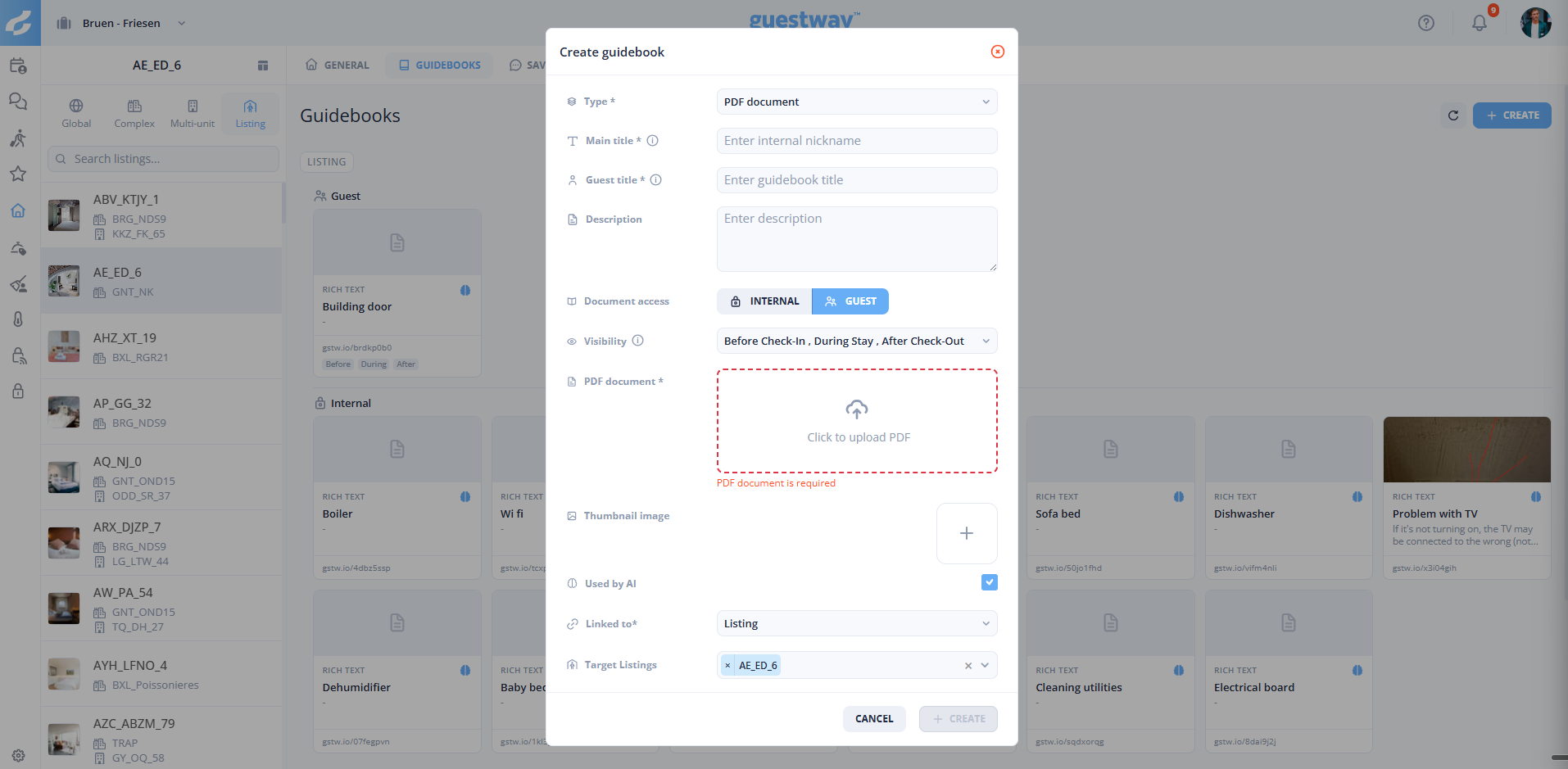
| **Type** | See *Types*. | Required. Cannot be changed later. |
| **Link URL** | The short link of the guidebook, with **Copy link**. | Only when you edit a guidebook that has a link. |
| **Main title** | The name your team sees in the lists. Guests do not see it. | Required. |
| **Guest title** | The title guests see in the guest portal. | Required. Only for **Guest Guidebook**. An internal document uses the **Main title**. |
| **Description** | A short text under the title. | Optional. |
| **Visibility** | **Before Check-In**, **During Stay** and **After Check-Out**: when guests see the guidebook in the guest portal. | All three by default. Only for **Guest Guidebook**. |
| **Website URL** | The address of the web page. | Required for **Website URL**. |
| **Rich text content** | The text of the guidebook. | Required for **Rich text**. |
| File | The PDF, image or video. Click or drag and drop the file. | Required for **PDF document**, **Image** and **Video**. |
| **Thumbnail image** | The image on the guidebook card. **Add thumbnail** opens the thumbnail editor. | Not for **Image**. |
| **Used by AI** | When on, the AI can use the guidebook. | On by default. |
| **Linked to** | **Global**, **Listing**, **Complex** or **Multi-unit**. | Required. Filled in with the property you are on. |
| **Target Listings**, **Target Complexes**, **Target Multi-Units** | The properties the guidebook is for. | Shows for the level chosen in **Linked to**. |
**Delete** in the edit dialog removes the guidebook.
You cannot delete a guidebook that a QR code opens. **This guidebook is in use** then lists those QR codes: click one to open it, or click **Go to QR codes** for the list. You must first choose another guidebook for each of these QR codes, or delete them. A deleted QR code does not count.
### Thumbnail editor
| Element | What it does | Limits |
| ------------------------ | ---------------------------------------------------------------------- | -------------------------------------------------- |
| **Choose image** | Selects the image. | Up to 10 MB. HEIC and HEIF are not supported. |
| **Adjust image** | Drag the image to place it. **Zoom** crops it. **Reset** starts again. | Zoom from 50% to 300%. The crop has the shape 5:4. |
| **Guest portal preview** | Shows the card as guests see it in the guest portal. | None |
| **Apply** | Uses the image as the thumbnail. | None |
## Template variables
A **Rich text** guidebook can have placeholders, for example the guest's first name or the check-in date. Type **@** in the text, or pick a variable in the panel on the right. The panel has a search field (*Search variables...*) and the groups **Guest**, **Booker**, **Reservation**, **Reservation financials**, **Property**, **Listing**, **Multi unit** and **Branding**. These are the same variables as in [saved replies](https://docs.guestway.io/inbox-and-messaging/saved-replies.md#template-variables).
The placeholders fill in with the details of the reservation when the guest opens the guidebook.
A QR code can open a guidebook with placeholders only after the guest logs in to the guest portal: choose **Guidebook in guest app** in the QR code. See [QR codes](https://docs.guestway.io/guest-experience/qr-codes.md).
## Guidebooks in the inbox
The **Guidebooks** card is on the **Listing** tab of the [reservation details panel](https://docs.guestway.io/inbox-and-messaging/unified-ai-inbox/reservation-details-panel.md#listing-tab). It shows guest guidebooks first, then internal documents with the badge **Internal**. The card is hidden when the property has no guidebooks.
| Action | What it does | Limits |
| ----------------- | ------------------------------------------------------------------------------------------------------------------------- | ------------------------------------------------------------------------------------------------------------------------- |
| Click a guidebook | Opens it. A **Rich text** guidebook opens with the details of this reservation filled in. An **Image** opens in a viewer. | **PDF document**, **Video** and **Rich text** need a reservation (*A reservation is required to preview this guidebook*). |
| **Copy link** | Copies the link for this guest. | Needs a reservation. Only for guidebooks with a link. |
| **+** | Opens **Create guidebook**, with **Linked to** filled in for the property of the reservation. | Only for a conversation with a reservation. |
What guests see is on [Guest portal](https://docs.guestway.io/guest-experience/guest-portal.md).
## Guidebooks and the AI
The AI uses guidebooks with **Used by AI** on. **Add Knowledge** in the [AI center](https://docs.guestway.io/ai/ai-center.md) also creates guidebooks: **Rich Text** or **PDF Document**, always with **Used by AI** on.
## Related
* [How to create a guidebook](https://docs.guestway.io/properties/guidebooks/how-to-create-a-guidebook.md)
* [How to share a guidebook with a guest](https://docs.guestway.io/properties/guidebooks/how-to-share-a-guidebook-with-a-guest.md)
* [How to create a QR code for a guidebook](https://docs.guestway.io/guest-experience/qr-codes/how-to-create-a-qr-code-for-a-guidebook.md)
* [QR codes](https://docs.guestway.io/guest-experience/qr-codes.md)
* [How to add knowledge to the AI](https://docs.guestway.io/ai/ai-center/how-to-add-knowledge-to-the-ai.md)
* [Guest portal](https://docs.guestway.io/guest-experience/guest-portal.md)
---
# Agent Instructions
This documentation is published with GitBook. GitBook is the documentation platform designed so that both humans and AI agents can read, navigate, and reason over technical content effectively. Learn more at gitbook.com.
## Querying This Documentation
If you need additional information that is not directly available in this page, you can query the documentation by asking a question.
Perform an HTTP GET request on the following URL with the `ask` and `goal` query parameters:
```
GET https://docs.guestway.io/properties/guidebooks.md?ask=&goal=
```
`ask` is the immediate question: it should be specific, self-contained, and written in natural language.
`goal` is what the user is ultimately trying to achieve, the reason they need the answer. Sharing it helps GitBook give you a better, more relevant answer. A goal is most helpful when it describes the outcome the user wants rather than restating the question. For example, with `ask=how do I create an API token`, a goal like `automate deployments from our CI pipeline` lets GitBook tailor the answer to that use case.
The response will contain a direct answer to the question and relevant excerpts and sources from the documentation.
Use this mechanism when the answer is not explicitly present in the current page, you need clarification or additional context, or you want to retrieve related documentation sections.