> For the complete documentation index, see [llms.txt](https://docs.guestway.io/llms.txt). Markdown versions of documentation pages are available by appending `.md` to page URLs; this page is available as [Markdown](https://docs.guestway.io/integrations/whatsapp/using-whatsapp-in-guestway.md).

# Using Whatsapp in Guestway

Once your WhatsApp number is connected, you can send and receive WhatsApp messages with guests directly from the Guestway Inbox — alongside all your other channels.

This page explains how WhatsApp conversations work, how to start a new conversation, and how to manage message templates.

***

#### How WhatsApp conversations work

WhatsApp's Business Platform uses a **24-hour conversation window** rule:

1. **You send a template message** → a new conversation opens with the guest.
2. **The guest replies** → a 24-hour free-messaging window opens.
3. **Within 24 hours of their last reply** → you can send any message freely, no template needed.
4. **After 24 hours without a guest reply** → the window closes and a template is required to re-open it.

This rule is enforced by Meta and applies to all businesses using the WhatsApp Business API.

<figure><img src="/files/kmjzS5V6VmdtkT1DZ5FS" alt=""><figcaption></figcaption></figure>

***

#### Starting a new conversation

{% @guideflow/guideflow-embed requestedUrl="<https://app.guideflow.com/player/3r3e0wlunk>" %}

To open a new WhatsApp conversation with a guest from the Guestway Inbox:

1. Open the guest's reservation or conversation in the **Inbox**.
2. In the message composer, select **WhatsApp** as the channel.
3. Click the **template selector** and choose a template from the list.
4. Review the pre-filled variable values — Guestway fills these in automatically from the reservation.
5. Click **Send**.

The guest receives the template message on WhatsApp. Once they reply, you can send free-form messages for the next 24 hours.

{% hint style="info" %}
If WhatsApp does not appear as a channel in the composer, your WhatsApp number may not be connected yet. Go to **Settings → Integrations** to check the status.
{% endhint %}

***

#### Replying to an incoming message

When a guest sends you a WhatsApp message, it appears in the Guestway Inbox automatically — no action needed to receive it. You can reply freely in the composer as long as you are within the 24-hour window from their last message.

If the window has closed, the composer will prompt you to send a template to re-open the conversation.

***

#### Message templates

**What are templates**

Templates are pre-approved message formats required to start a new WhatsApp conversation. They are created in your WhatsApp Business Account and approved by Meta before they can be used.

**Default template**

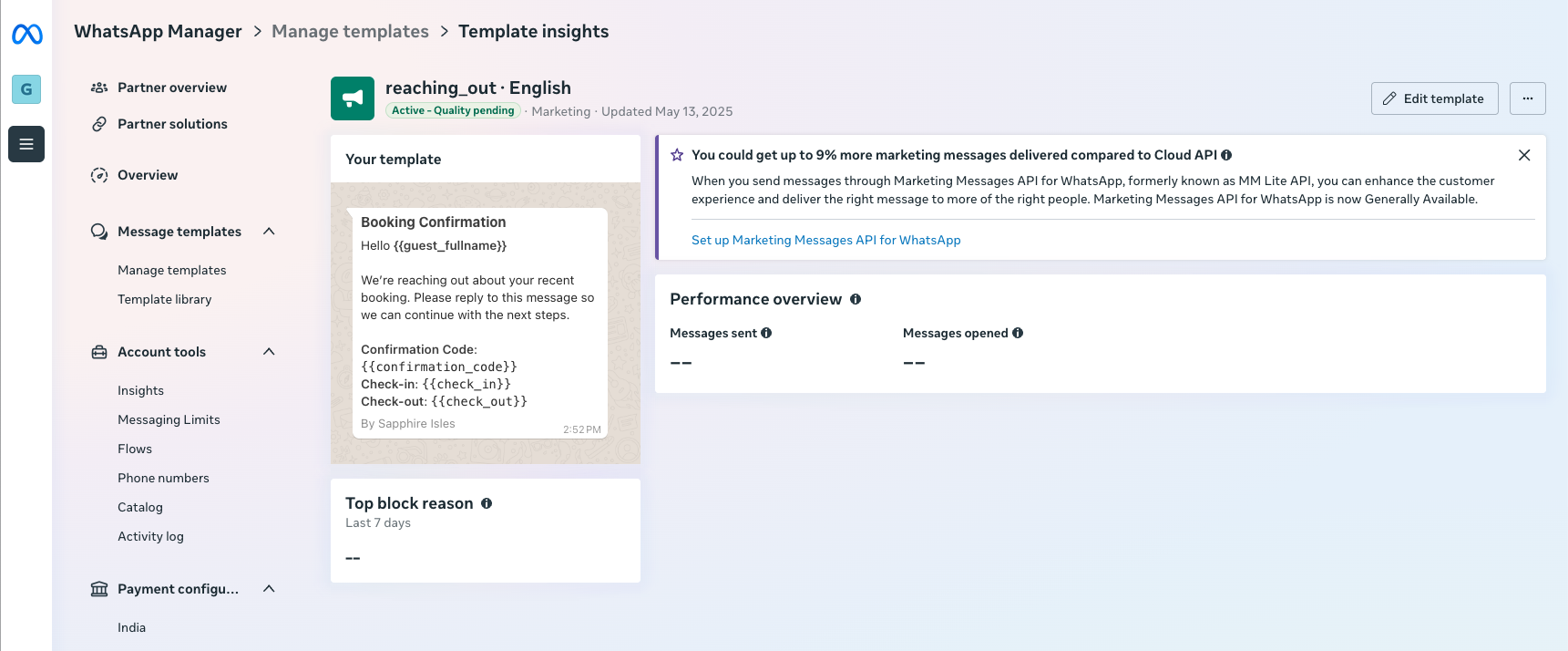
Guestway automatically creates a default template in your WhatsApp Business Account — you can use it immediately to start conversations without any additional setup.

<figure><img src="https://3944456244-files.gitbook.io/~/files/v0/b/gitbook-x-prod.appspot.com/o/spaces%2FBrW4TrHoVgRLXkGBzLVy%2Fuploads%2FkimHjt0sGOAOyfONhYr0%2FScreenshot%202026-02-19%20at%2015.52.49.png?alt=media&#x26;token=5b0e63af-3735-4a29-a956-324b2f8cc6ac" alt=""><figcaption><p>The default Guestway template as it appears in WhatsApp Manager</p></figcaption></figure>

**Creating custom templates**

{% @guideflow/guideflow-embed requestedUrl="<https://app.guideflow.com/player/er5j76lh6k>" %}

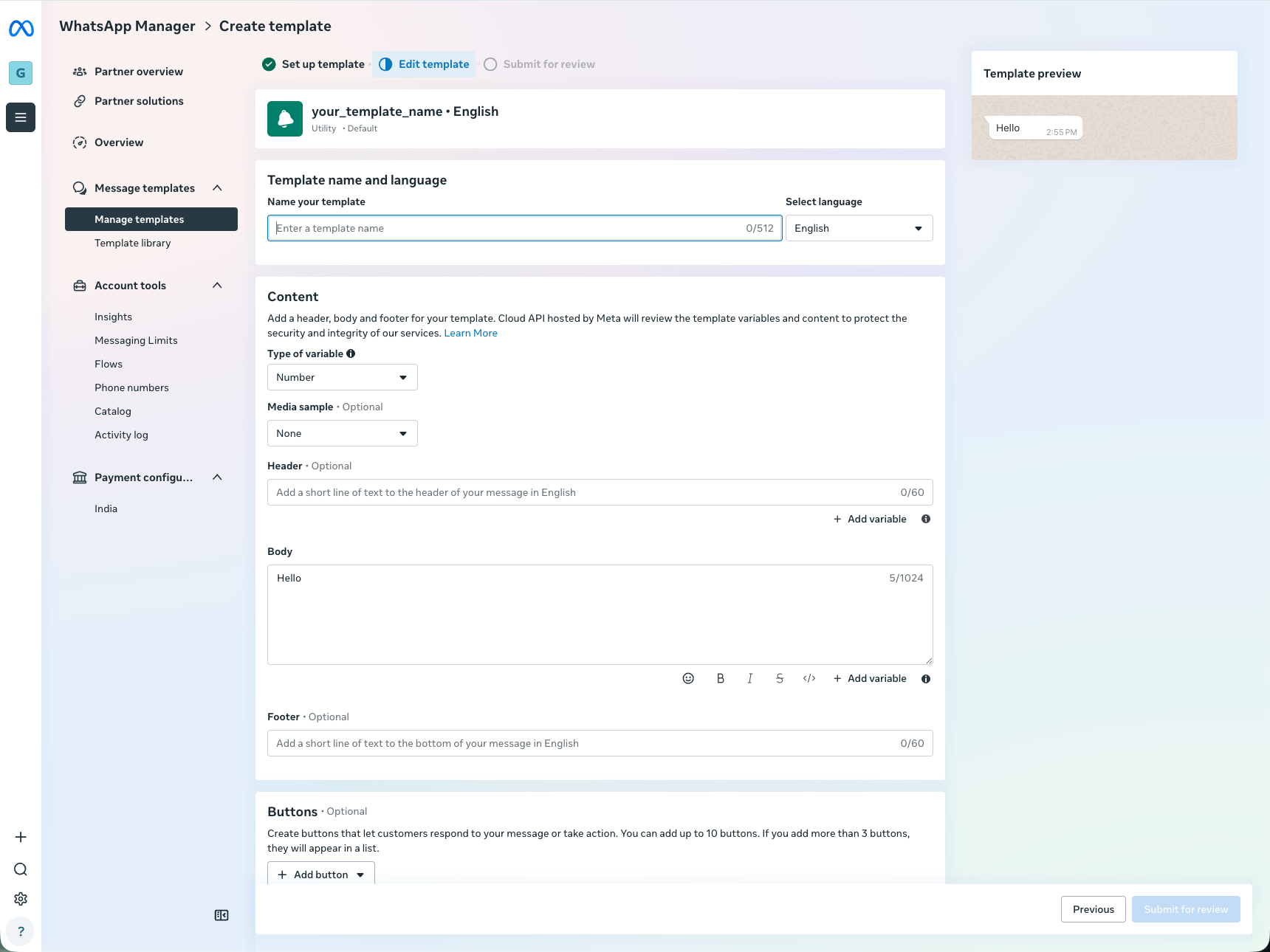
To create your own templates, go to **Meta WhatsApp Manager** and follow these requirements so they work correctly in Guestway:

**Required settings:**

* **Category:** Utility → Default
* **Variables:** use named variables (e.g. `{{name}}`) — not numbered variables (e.g. `{{1}}`)
* **Variable placement:** body text only — no variables in header or footer
* **No buttons or media attachments**

**What to expect:**

* Templates appear in Guestway only after Meta approves them — approval usually takes 5–10 minutes
* Deleted templates may take a few minutes to disappear from Guestway
* If a variable has no value for a specific guest, Guestway substitutes a dot (`.`)

<figure><img src="https://3944456244-files.gitbook.io/~/files/v0/b/gitbook-x-prod.appspot.com/o/spaces%2FBrW4TrHoVgRLXkGBzLVy%2Fuploads%2FAUR8I6SsTP4A1DHbRpzN%2FScreenshot%202026-02-19%20at%2015.55.29.png?alt=media&#x26;token=542333ff-6f0f-4dc3-82b1-a54770eb64ba" alt=""><figcaption><p>Template configuration in Meta WhatsApp Manager</p></figcaption></figure>

***

#### Available template variables

{% @guideflow/guideflow-embed requestedUrl="<https://app.guideflow.com/player/dr935lvaor>" %}

The full list of supported variables lives inside Guestway under **Saved replies** — the same set powers both saved replies and WhatsApp templates. New variables are added regularly, so the in-product list is always the source of truth.

Insert a variable into your template body and Guestway will fill it in from the reservation automatically when the message is sent.

Most variables also have one or more **aliases** — shorter, alternative names that resolve to the same value. For example, `guest_full_name` and `name` are interchangeable.

{% hint style="info" %}
**Prefer the shorter alias in WhatsApp templates.** WhatsApp limits how long variable names can be inside a template definition, so using the alias (for example `name` instead of `guest_full_name`) gives you more room to work with — and keeps your template easier to read.
{% endhint %}

A few examples:

<table><thead><tr><th width="198">Variable Example</th><th>Alias Example</th><th>Description</th><th>Example value</th></tr></thead><tbody><tr><td><code>guest_full_name</code></td><td><code>name</code></td><td>Full name of the guest or owner</td><td>John Doe</td></tr><tr><td><code>guest_primary_email</code></td><td><code>email</code></td><td>Primary email of the guest or owner</td><td>john.doe@example.com</td></tr><tr><td><code>reservation_check_in_date_localized</code></td><td><code>check_in_date</code></td><td>Check-in date of the reservation</td><td>2024-06-01</td></tr><tr><td><code>reservation_check_in_time_localized</code></td><td><code>check_in_time</code></td><td>Check-in time of the reservation</td><td>15:00</td></tr><tr><td><code>guest_app_link</code></td><td><code>portal_link</code></td><td>Link to the guest app for the reservation</td><td>https://portal.guestway.io/ABC123DEF45</td></tr></tbody></table>

***

#### Template Examples That You Can Use

Use these examples below to get started, they will work straight away after you set them up:

* Stay confirmed with info: \
  ![](/files/KhlMegzELfDwkaOnczc7)
* Booking confirmation with pre check-in form:\
  ![](/files/ovaRELeuAdKKesqmIXFz)
* Welcome message with reservation info: \
  ![](/files/YEx50aIgwz3o2YFCW31j)

***

#### Related pages

* Meta setup & Guestway integration — connect a new number or migrate an existing one.
* Connect your existing WhatsApp Business App (Coexistence) — keep using the WhatsApp app on your phone.


---

# Agent Instructions
This documentation is published with GitBook. GitBook is the documentation platform designed so that both humans and AI agents can read, navigate, and reason over technical content effectively. Learn more at gitbook.com.

## Querying This Documentation
If you need additional information that is not directly available in this page, you can query the documentation dynamically by asking a question.

Perform an HTTP GET request on the current page URL with the `ask` query parameter, and the optional `goal` query parameter:

```
GET https://docs.guestway.io/integrations/whatsapp/using-whatsapp-in-guestway.md?ask=<question>&goal=<endgoal>
```

`ask` is the immediate question: it should be specific, self-contained, and written in natural language.
`goal` is optional and describes the broader end goal you are ultimately trying to accomplish on behalf of the user. GitBook uses it to tailor the answer towards what is most useful for that goal.

The response will contain a direct answer to the question and relevant excerpts and sources from the documentation.

Use this mechanism when the answer is not explicitly present in the current page, you need clarification or additional context, or you want to retrieve related documentation sections.