
The WhatsApp integration connects a WhatsApp Business number to the Guestway inbox through the WhatsApp Business Platform of Meta.
The integration
WhatsApp is in the Communication category of the Integration Wizard. It connects with WhatsApp Embedded Sign-Up: Login with Facebook opens the sign-up window of Meta, where you choose the business portfolio, the WhatsApp Business account and the phone number.
The sign-up window offers two setups:
New number
A number that is new to WhatsApp, or an existing number that you move fully to the platform. The WhatsApp app stops working for that number.
Coexistence
The number of your WhatsApp Business app. You keep using the app, and Guestway works with the same number.
Integration Configuration shows the WhatsApp Business Account ID, the WhatsApp Business Phone Number ID and the Facebook Business ID. You cannot change them.
The integration has no component tabs. Guestway imports your message templates every 5 minutes. See WhatsApp message templates.
WhatsApp in the inbox
Reply form
The message medium WhatsApp, with the name of the integration in the tooltip.
Sending to
The phone number of the guest. You can choose another number, add one, or Mark as primary.
Time to reply:
The time left in the 24-hour window.
WhatsApp templates only
The window is closed, or the guest has not written on WhatsApp yet. You can only send a template.
Failed message
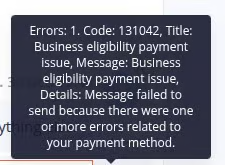
A red icon. Its tooltip shows the error, and Retry sends again.
A number that opted out shows This phone number has opted out and will not receive any messages.
With coexistence, the messages that your team sends from the WhatsApp Business app also appear in the inbox, as messages from you.
Supported countries
Coexistence works with phone numbers from every country except:
Nigeria
South Africa
With a number from these countries, you can only connect a new number or move a number fully to the platform. Meta may change this list.
Limits of coexistence
While the WhatsApp Business app is connected, Meta changes these app features:
Disappearing messages are off for all one-to-one chats.
View once messages are off.
Live location sharing is off in one-to-one chats.
Broadcast lists are off. Existing lists become read-only, and you cannot create new ones.
Group chats are not synced to Guestway. They keep working in the app.
At most 20 messages per second can be sent.
You must open the WhatsApp Business app at least once every 14 days, or the connection stops. A number can be connected to one Cloud API provider at a time. When you connect, all companion devices are unlinked. WhatsApp for Windows and WhatsApp for WearOS do not work with coexistence.
Voice and video calls, catalogs, WhatsApp Status and the other business tools keep working in the app.
Billing requirement
Meta charges the messages that Guestway sends through the WhatsApp Business Platform, at Meta's standard prices. With coexistence, messages that you send from the WhatsApp Business app stay free.
The WhatsApp Business account must have a default payment method, set in Meta Business Manager under WhatsApp Business Account → Payment settings. Without it, messages are not delivered, and the failed message shows WhatsApp Business Account payment issue.
Disconnecting
Delete on the integration stops WhatsApp in Guestway. Your templates and your phone number stay in your WhatsApp Business account. With coexistence, you also disconnect in the WhatsApp Business app. See How to disconnect WhatsApp.