> For the complete documentation index, see [llms.txt](https://docs.guestway.io/llms.txt). Markdown versions of documentation pages are available by appending `.md` to page URLs; this page is available as [Markdown](https://docs.guestway.io/inbox-and-messaging/unified-ai-inbox/reservation-details-panel.md).
# Reservation details panel
The reservation details panel is the right column of the inbox: the reservation, listing, guests, access, operations and charges.
## Header
| Element | What it does |
| ------------------------ | --------------------------------------------------------------------------------------------------------------------------------------------------------------------------------------------------------------------------- |
| Title | The confirmation code. Without a code: **Inquiry**, **Owner Reservation**, the guest name or **Reservation**. Click the title to copy it. When the guest has more reservations, the title is a list to switch between them. |
| Status badge | The status of the reservation. See [Conversation statuses](https://docs.guestway.io/inbox-and-messaging/unified-ai-inbox.md#conversation-statuses). |
| **View in Guest Portal** | Opens the guest portal of the reservation. Available when a guest journey with pre-check-in or guest portal access is set up. See [Guest portal](https://docs.guestway.io/guest-experience/guest-portal.md). |
| **View in \[PMS]** | Opens the reservation in your PMS. |
| **Hide details** | Closes the panel. **Details** in the header of the conversation opens it again. |
The **⋮** menu has **View in Guest Portal**, **View in \[PMS]**, **View in \[OTA]** (the booking channel), **Mark as no show**, **Mark as confirmed arrival** and **Cancel on Airbnb**. The menu shows when **Mark as no show**, **Mark as confirmed arrival** or **Cancel on Airbnb** is available.
**Cancel on Airbnb** cancels an Airbnb reservation as the host. It shows only while Airbnb lets you cancel the reservation, and not after the check-in date. It is greyed out when your role cannot cancel Airbnb reservations. See [How to cancel an Airbnb reservation](https://docs.guestway.io/integrations/online-travel-agencies-ota/airbnb/how-to-cancel-an-airbnb-reservation.md).
## Tabs
| Tab | What it shows | Limits |
| --------------- | ------------------------------------------------- | ---------------------------------------------------------------------------- |
| **Reservation** | The booking, approvals and the cards of the stay. | None |
| **Listing** | The property of the reservation. | Hidden when the reservation has no listing or multi-unit. |
| **Guests** | The booker, the company and the guests. | None |
| **Access** | The locks and the codes of the stay. | Hidden when your organization has no locks and no codes from another system. |
| **Operations** | Cleaning and checklists. | Hidden for an inquiry. |
| **Charges** | Payments and security deposits. | None |
## Reservation tab
### Overview
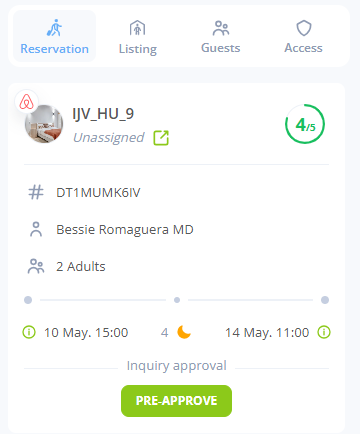
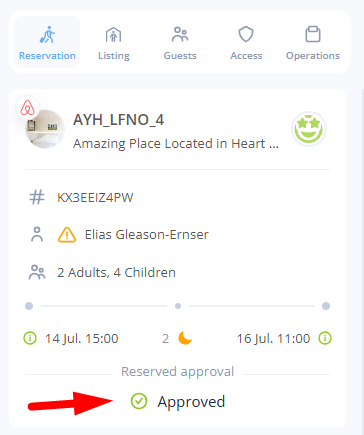
The top card shows the listing, the guest name, the number of guests and badges such as **Airbnb Superhost**, **Airbnb Host**, **Owner**, protection and security deposit. A line under the guest name shows when the reservation was booked: **Booked on** and the date and time, or **Booked by**, the name of the booker, **on** and the date and time when the booker is not the guest. The date and time are in the time zone of the listing. Hover them to see the year.
| Element | What it shows |
| ---------------------------- | --------------------------------------------------------------------------------------------------------------------------------------------------------------------------------------------- |
| **Reservation Risk Score** | For an inquiry or a reserved booking: the risk of the booking, with the reasons under **General** and **Reviews**. |
| **Guest Satisfaction Score** | For other reservations: how satisfied the guest is, from **Very dissatisfied** to **Very satisfied**, with the reasons. A score that your team changed shows the original score. |
| Timeline | **Arrival**, **Nights** and **Departure**. Hover a date to see the check-in or check-out time, the default and original times, the estimated arrival or departure, and the first room access. |
### Approvals
| Element | What it does |
| ----------------------------- | --------------------------------------------------------------------------------------------------------------------------------------------------------------------------------------------------- |
| **Pre-Approve** | Pre-approves an inquiry, for example on Airbnb. The status changes to **Pre-approving**, then **Pre-approved**. |
| **Approve** / **Decline** | Answers a booking request that needs your approval, for example an Airbnb request to book. The result shows as **Approved** or **Declined**. |
| **Possible no show detected** | Shows when Guestway detects that the guest may not have arrived, for example when the smart lock recorded no entry. **Confirm** marks the reservation as a no-show. **Dismiss** removes the banner. |
### Alterations
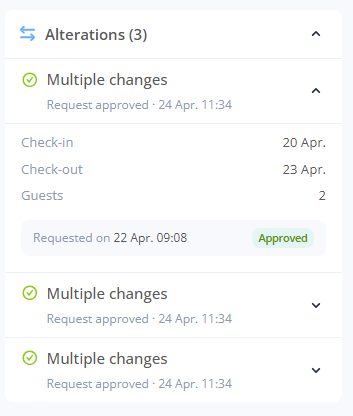
**Alterations (N)** lists the changes to the booking that the guest asked for or that you proposed, for example new dates or another number of guests.
For an Airbnb reservation, **Create** next to **Alterations** opens **Change reservation**, where you propose new dates, guests, a total price or another listing to the guest. **Create** shows only while Airbnb lets you change the reservation, and not after the check-out date. See [How to propose a change to an Airbnb reservation](https://docs.guestway.io/integrations/online-travel-agencies-ota/airbnb/how-to-propose-a-change-to-an-airbnb-reservation.md).
| Field | What it shows |
| ------------------------------ | ------------------------------------------------------------------------------------------------------------------------------------------------------------------------------------------------------------------------------------------------------------------------------------------------------- |
| Title | **Dates alteration**, **Check-in alteration**, **Check-out alteration**, **Guest count alteration**, **Listing alteration**, **Multiple changes** or **Alteration request**. |
| Status | For a change that the guest asked for: **Awaiting review**, **Request approved**, **Request declined**, **Request canceled** or **Request voided**. For a change that you proposed: **Waiting for the guest**, **Request approved**, **Request declined**, **Request withdrawn** or **Request voided**. |
| Changes | The original and the new value of check-in, check-out, adults, children, infants, pets, total guests and the listing. |
| **Host payout details** | **Original payout**, **New payout** and **Price difference**. |
| **Requested on** / **Sent on** | When the guest asked for the change or when you sent it, and who approved, declined or withdrew it. |
| **Approve** / **Decline** | Answers a change that the guest asked for and that is **Awaiting review**. |
| **Withdraw** | Takes back a change that you proposed, while it is **Waiting for the guest**. The reservation stays as booked. |
**Create** and **Withdraw** are greyed out when your role cannot propose changes to reservations. While a change that you proposed waits for the guest, you cannot propose another one.
### Upsells
**Upsells (N)** lists the upsell requests of the reservation, and how many are to review. The statuses and the approval are on [Upsells](https://docs.guestway.io/guest-experience/upsells.md#requests-on-the-reservation) and [How to review upsell requests](https://docs.guestway.io/guest-experience/upsells/how-to-review-upsell-requests.md).
### Resolution center
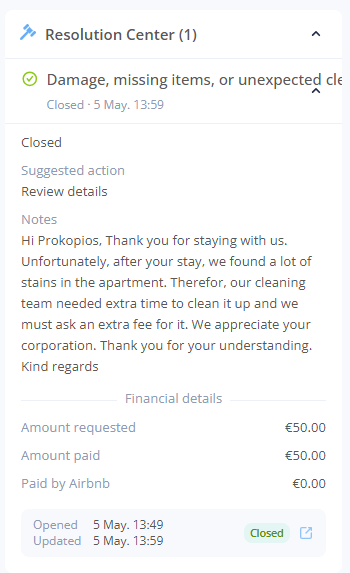
**Resolution Center (N)** lists the cases that the channel opened on the reservation, for example a damage claim on Airbnb.
| Field | What it shows |
| ------------------------ | ---------------------------------------------------------------------------------------------------------------------------------- |
| Reason | What the case is about. |
| Status | **Open**, **Submitted**, **Escalated**, **Closed**, **Partially Paid**, **Declined**, **Retracted**, **Abandoned** or **Unknown**. |
| **Suggested action** | What the channel recommends as the next step. |
| **Notes** | The messages about the case. |
| **Financial details** | **Amount requested**, **Amount paid**, **Paid by Airbnb** and **Amount charged**. |
| **Opened** / **Updated** | When the case was opened and last changed, with a link to the case on the channel. |
### Pre-check-in
The **Pre-Check-In** card shows how far the guest is with pre-check-in: **Not started**, **Opened**, **In progress**, **Completed**, **Finalised**, **Bypassed** or **No Pre-Checkin**.
Each step of the [guest journey](https://docs.guestway.io/guest-experience/guest-journey.md) has a row: **Guest Information**, **Trip Details**, **Agreement**, **Protection**, **Upsells**, **Fees** and **ID Verification**, with its status, for example **Completed**, **Pending**, **Skipped** or **Paid**.
| Element | What it does |
| ---------------------------- | ------------------------------------------------------------------------------------------------------------------------------------------------ |
| **View information** | Shows what the guest entered: the guests, billing details, damage waiver, security deposit, upsells, fees and the result of the ID verification. |
| **Bypass full pre-check-in** | Marks pre-check-in as done without the guest. You cannot undo it. |
**View information** shows one card for each part of pre-check-in:
| Card | What it shows |
| ------------------------------------------------------- | --------------------------------------------------------------------------------------------------------------------------------------------------------------------------------------------------------------------------- |
| The name of the main guest, or **Primary guest** | The guest information and the trip details. For the agreement: **Rental agreement** and **House rules**, each with a check mark when the guest accepted it, and the **Signature** when the guest signed. |
| The name of each other guest, or **Additional guest** | The guest information of each other guest who filled in a field. |
| **Billing details** | **Company name**, **VAT number** and **Billing address**, when the guest filled them in. |
| **Damage waiver**, **Security deposit**, **Protection** | The protection that the guest chose. |
| **Upsells**, **Fees** | What the guest bought or paid. |
| ID verification | The type of document, a **% match** badge, **Surname**, **Given names**, **Date of birth**, **Document no.** and the photos **Front ID**, **Back ID** and **Selfie**. Click a photo to see it larger, zoom in or rotate it. |
The reservation shows whether the guest accepted the rental agreement and the house rules, and the signature. It does not show the text of the agreement that the guest accepted.
You cannot download or export the pre-check-in answers, the signed agreement or the ID documents, for example as a PDF. You can only view them in **View information**.
ID verification data is deleted after the period of your organization's data retention policy. Then **View information** shows **ID Verification Data Deleted**, with the date. The retention period, and whether users with the Operator role can see ID photos, are in [Organization details](https://docs.guestway.io/account-and-administration/organization-details.md).
### Services
**Services (N)** lists the services of the reservation, for example a baby bed or a transfer, grouped by category, with the badge **Manually assigned** or **Automatically assigned**.
The **+** button opens **Available Services**, where you add services **On Arrival** or for the **Whole Stay**. Which services you can add, and until when, depends on the [service templates](https://docs.guestway.io/guest-experience/service-templates.md).
You can delete only the services that were added by hand. Deleting a service does not refund the guest, and it stops the access or automated messages linked to it. You cannot undo it.
### Group bookings
**Group bookings (N)** lists the other reservations of a group, with the badges **Current** and **Primary**, and links to their conversation and reservation.
### Notes
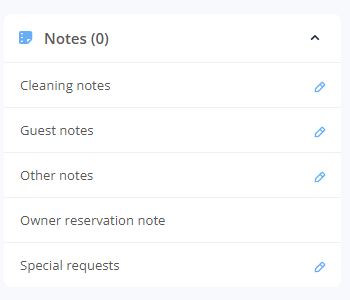
**Notes (N)** shows the notes of the reservation from your PMS, one row for each note type of the PMS. Click a note to edit it.
### Chat summary
**Chat summary** is a short summary of the conversation, made by AI.
### Calendar
The calendar shows one month of the listing. The current reservation has the colour of its status. Other reservations of the listing show in the background. Hover a reservation to see the guests, the arrival and the departure.
### Documents
**Documents (N)** holds the files of the reservation, for example an invoice or a receipt. **Upload documents** adds files with a **Type** and a **Display name (optional)**. Each document has **Copy link**, **Download**, **Reset share link** and **Delete**.
### Custom fields
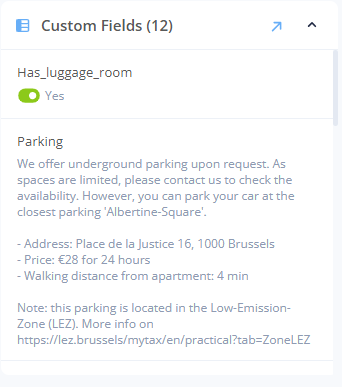
**Custom Fields (N)** shows the reservation custom fields and their values. See [Custom fields](https://docs.guestway.io/properties/custom-fields.md).
### Price
The price shows the rate plan, **Accommodation Fare**, **Total Fees**, **Total Taxes**, **Total**, **Channel Fee**, **Total Net Income** and **Payout**.
## Listing tab
| Element | What it shows |
| ----------------- | ---------------------------------------------------------------------------------------------------------------------------------------------------------------------------------------------------------- |
| Listing | The nickname and title from your PMS, the occupancy (**Occupied**, **Vacant** or **Mixed occupancy**) and **View listing**. |
| Address | The address, with the guest capacity, floor and apartment. |
| Details | **Type**, **Bathrooms**, **Bedrooms**, the beds, **Wi-fi network** and **Wi-fi password**. |
| Thermostats | **Current Temperature** and **Target Temperature**. See [Thermostats](https://docs.guestway.io/reservations-and-operations/thermostats.md). |
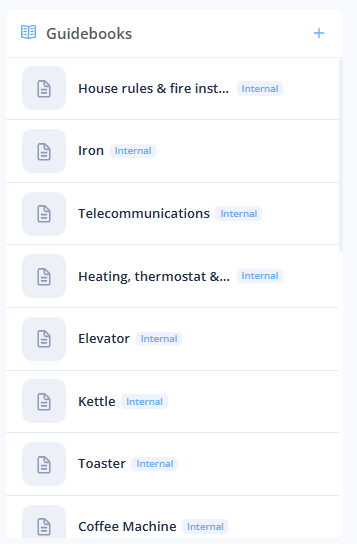
| **Guidebooks** | The guidebooks of the listing, with **Copy link**. Internal guidebooks have the badge **Internal**. **+** opens **Create guidebook**. See [Guidebooks](https://docs.guestway.io/properties/guidebooks.md). |
| **Custom Fields** | The property custom fields and their values for this listing. See [Property custom fields](https://docs.guestway.io/properties/custom-fields/property-custom-fields.md). |
| **Amenities (N)** | The amenities of the listing. |
## Guests tab
| Element | What it shows |
| -------------------------- | ------------------------------------------------------------------------------------------------------------------------------------------------------------------------------------------------------------------------------------------------------------------------------------------------------------------------------------------------------------------------------------ |
| Contact | The phone numbers and email addresses. **Mark as primary** makes one the primary contact detail. A phone number that opted out gets no messages. |
| \[Channel] **Profile** | The guest's profile on the booking channel, for example Airbnb: **User since**, photo, location, languages, reviews and the verifications **Email verified**, **Identity verified**, **Work email verified** and **Phone verified**. |
| Satisfaction | The guest satisfaction score. Your team can change it. |
| **Reservation Risk Score** | The risk score of the booking. |
| Details | Hometown, birthday, country, **Preferred language**, **Average Review Rating** and **Profile link**. |
| **Booker** | The person who booked, with the confirmation code. |
| **Company** | The company that the reservation is booked for: the company name, VAT number, additional VAT number, invoicing email, phone number, address and country. Only the details with a value show. Shows only when the reservation has a company in Apaleo. See [What syncs from your PMS](https://docs.guestway.io/integrations/property-management-systems/what-syncs-from-your-pms.md). |
| **Additional guests (N)** | The other guests, with their age and contact details. |
| **License plates** | The license plates of the guest, for locks with license plate recognition. |
## Access tab
| Element | What it shows or does |
| ----------------------------- | ---------------------------------------------------------------------------------------------------------------------------------------------------------------------------------------- |
| Codes from another system | **Managed by \[PMS]** or **Managed externally**: codes that a connected system supplies. |
| Smart lock codes | One row for each door, with the lock, battery, validity and status: **Scheduled**, **Granting**, **Granted**, **Revoking**, **Revoked** or **Expired**. The eye icon shows the PIN code. |
| **Share** | Puts the code in the message box. |
| **Disable Code** / **Enable** | Turns one code off or on. |
| **Open Door** | Opens the door remotely. |
| **Extend Access** | Changes the time window of one code. |
| Static locks | The static lock codes. They are not sent to the guest automatically. |
The **Manage** section acts on all locks of the stay:
| Action | What it does |
| --------------------- | -------------------------------------------------------------------------------------------- |
| **Re-generate codes** | Replaces all smart lock and static lock codes with new codes. |
| **Extend access** | Extends the time window of all codes, for example for an early check-in or a late check-out. |
| **Enable all locks** | Turns all codes on. |
| **Disable all locks** | Turns all codes off, so nobody can enter with them. |
See [Smart locks](https://docs.guestway.io/reservations-and-operations/smart-locks.md) and [Static locks](https://docs.guestway.io/reservations-and-operations/static-locks.md).
## Operations tab
| Element | What it shows |
| ------------------------------------------------------ | ------------------------------------------------------------------------------------------------------------------------------------------------------------------------------------------------------------------------------------------------------------------------------------------------------------------------------------- |
| **Pre-arrival cleaning** / **Post-departure cleaning** | The cleaning task with its status (**Done**, **Pending**, **Awaiting inspection** or **Cancelled**), **Clean team**, **Finished by**, the condition of the unit (**Damaged** or **No damage**, **Very dirty** or **Acceptable**), notes and photos. See [Cleaning](https://docs.guestway.io/reservations-and-operations/cleaning.md). |
| **Checklist** | The checklist items of the stay and which are **Completed**. See [Checklists](https://docs.guestway.io/properties/checklists.md). |
## Charges tab
The **Payment** menu creates a **Charge** (a one-time payment by payment link) or a **Security deposit**: **Hold only** (saves the card and holds the amount at a chosen time) or **Charge & refund** (charges the guest now and refunds later). You need a billing account. See [Billing](https://docs.guestway.io/account-and-administration/billing.md).
| Field of a new charge | What it does | Limits |
| --------------------- | ------------------------------------------------------ | ------------------------------------------------ |
| **Amount** | The amount the guest pays. | The minimum and maximum of your billing account. |
| **Label (optional)** | The description of the charge. | 255 characters. |
| **Expires in** | How long the payment link works: 1, 6, 12 or 24 hours. | 24 hours by default. |
A charge has the status **Pending**, **Succeeded**, **Expired**, **Failed** or **Removed**.
| Action | What it does |
| ------------------------ | -------------------------------------------------------------------------------------------- |
| **Copy payment link** | Copies the link that the guest pays with. **Copy payment link (short)** copies a short link. |
| **View payment details** | Shows the payment. |
| **Sync from Stripe** | Updates the status of the charge. |
| **Refund** | Refunds the guest. |
| **Cancel charge** | Cancels a pending charge. |
The security deposit options are on [Guest journey](https://docs.guestway.io/guest-experience/guest-journey.md).
## Conversations without a reservation
For a **New Guest** or a **Website Chat** conversation, the panel shows the guest and these actions:
| Action | What it does | Limits |
| ----------------------- | -------------------------------------------------------------------------------------- | ---------- |
| **Link reservation** | Links the conversation to a reservation. | Only once. |
| **Block email address** | Blocks the sender. See [Inbox](https://docs.guestway.io/inbox-and-messaging/inbox.md). | None |
| **Block email domain** | Blocks every sender of the domain. | None |
## Related
* [Unified AI inbox](https://docs.guestway.io/inbox-and-messaging/unified-ai-inbox.md)
* [Reservations](https://docs.guestway.io/reservations-and-operations/reservations.md)
* [How to review upsell requests](https://docs.guestway.io/guest-experience/upsells/how-to-review-upsell-requests.md)
* [How to cancel an Airbnb reservation](https://docs.guestway.io/integrations/online-travel-agencies-ota/airbnb/how-to-cancel-an-airbnb-reservation.md)
* [How to propose a change to an Airbnb reservation](https://docs.guestway.io/integrations/online-travel-agencies-ota/airbnb/how-to-propose-a-change-to-an-airbnb-reservation.md)
* [About AI suggestions and sentiment](https://docs.guestway.io/inbox-and-messaging/unified-ai-inbox/about-ai-suggestions-and-sentiment.md)
* [Organization details](https://docs.guestway.io/account-and-administration/organization-details.md)
---
# Agent Instructions
This documentation is published with GitBook. GitBook is the documentation platform designed so that both humans and AI agents can read, navigate, and reason over technical content effectively. Learn more at gitbook.com.
## Querying This Documentation
If you need additional information that is not directly available in this page, you can query the documentation by asking a question.
Perform an HTTP GET request on the following URL with the `ask` and `goal` query parameters:
```
GET https://docs.guestway.io/inbox-and-messaging/unified-ai-inbox/reservation-details-panel.md?ask=&goal=
```
`ask` is the immediate question: it should be specific, self-contained, and written in natural language.
`goal` is what the user is ultimately trying to achieve, the reason they need the answer. Sharing it helps GitBook give you a better, more relevant answer. A goal is most helpful when it describes the outcome the user wants rather than restating the question. For example, with `ask=how do I create an API token`, a goal like `automate deployments from our CI pipeline` lets GitBook tailor the answer to that use case.
The response will contain a direct answer to the question and relevant excerpts and sources from the documentation.
Use this mechanism when the answer is not explicitly present in the current page, you need clarification or additional context, or you want to retrieve related documentation sections.