> For the complete documentation index, see [llms.txt](https://docs.guestway.io/llms.txt). Markdown versions of documentation pages are available by appending `.md` to page URLs; this page is available as [Markdown](https://docs.guestway.io/ai/ai-center.md).

# AI center

The AI center holds the knowledge the AI uses to answer guests, shows how well it answers, and sets when Auto-Pilot replies on its own.

{% hint style="info" %}
**Requirements**

* A role with permission to view the AI center. Adding, editing and accepting knowledge needs edit permission as well.
* A single organization. The AI center is not available in a hub.
  {% endhint %}

**AI Center** is in the left-hand menu, and in the profile menu at the top right. It has six tabs: **Add Knowledge**, **Browse**, **Dashboard**, **Suggestions**, **Playground** and **Auto-Pilot**. Without access, a link to the AI center shows *You do not have permission to access AI Center.*

## Add Knowledge

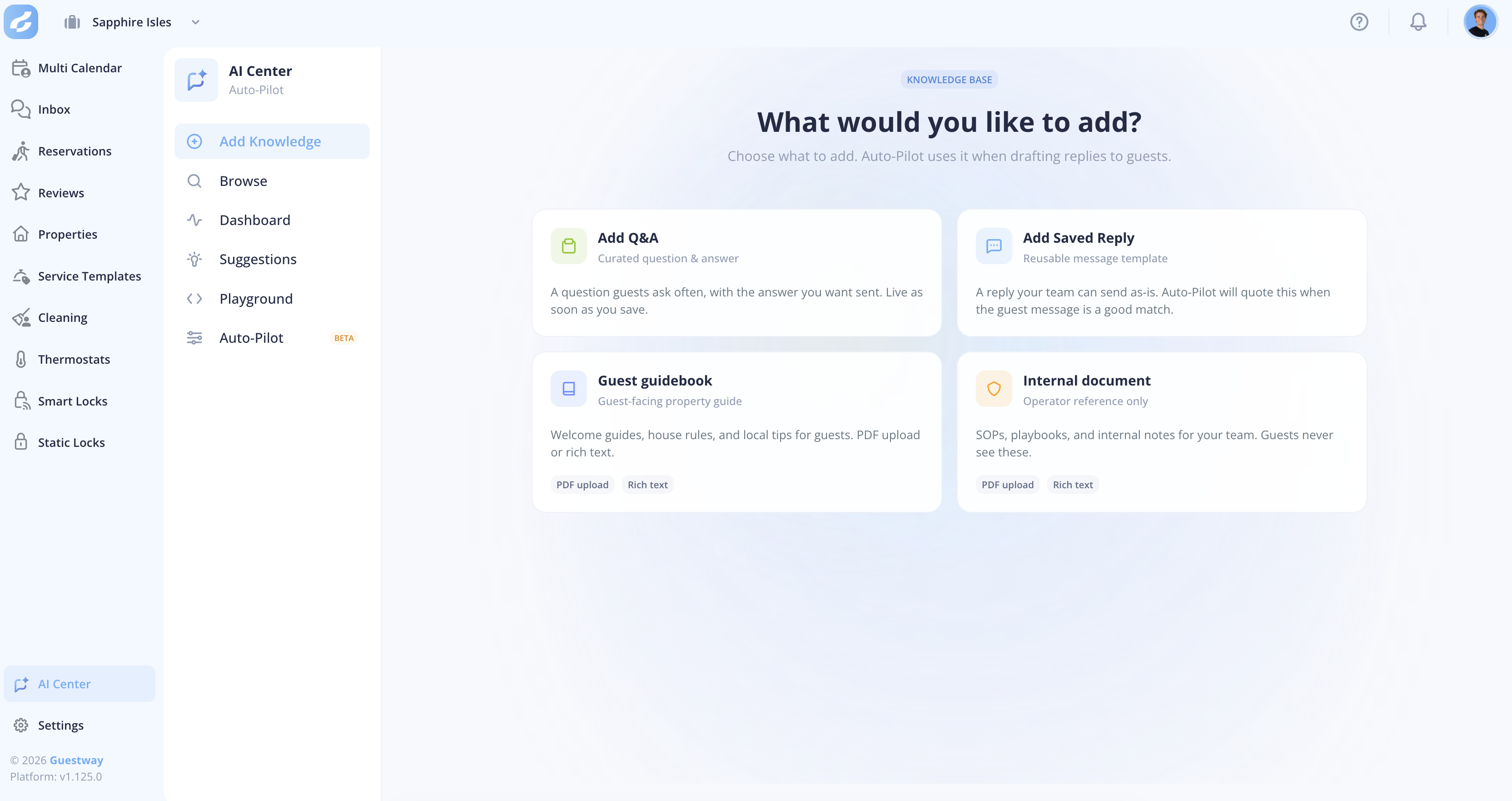
<figure><img src="https://content.gitbook.com/content/kBDBFX4VDrFqOnghyBKx/blobs/8FSWJuM6FwAomutGGqOX/image.png" alt=""><figcaption><p>The Add Knowledge landing page.</p></figcaption></figure>

| Type                  | What it is                                                                                       | Who sees it                                                                    |
| --------------------- | ------------------------------------------------------------------------------------------------ | ------------------------------------------------------------------------------ |
| **Q\&A**              | One question guests ask often, with the exact answer you want them to get.                       | Guests, through AI replies.                                                    |
| **Saved reply**       | A complete message that your team sends as it is, such as check-in instructions or parking info. | Guests, through AI replies. Your team can also insert it by hand in the inbox. |
| **Guest guidebook**   | Welcome guides, house rules and local tips, as rich text or PDF.                                 | Guests, in the guest portal and through AI replies.                            |
| **Internal document** | SOPs, playbooks and internal notes for your team, as rich text or PDF.                           | Your team and the AI. Guests never see the document.                           |

Guidebooks and saved replies in **Properties** with **can be used by AI** switched on appear in the AI center automatically. They stay in sync when you edit them.

### Q\&A

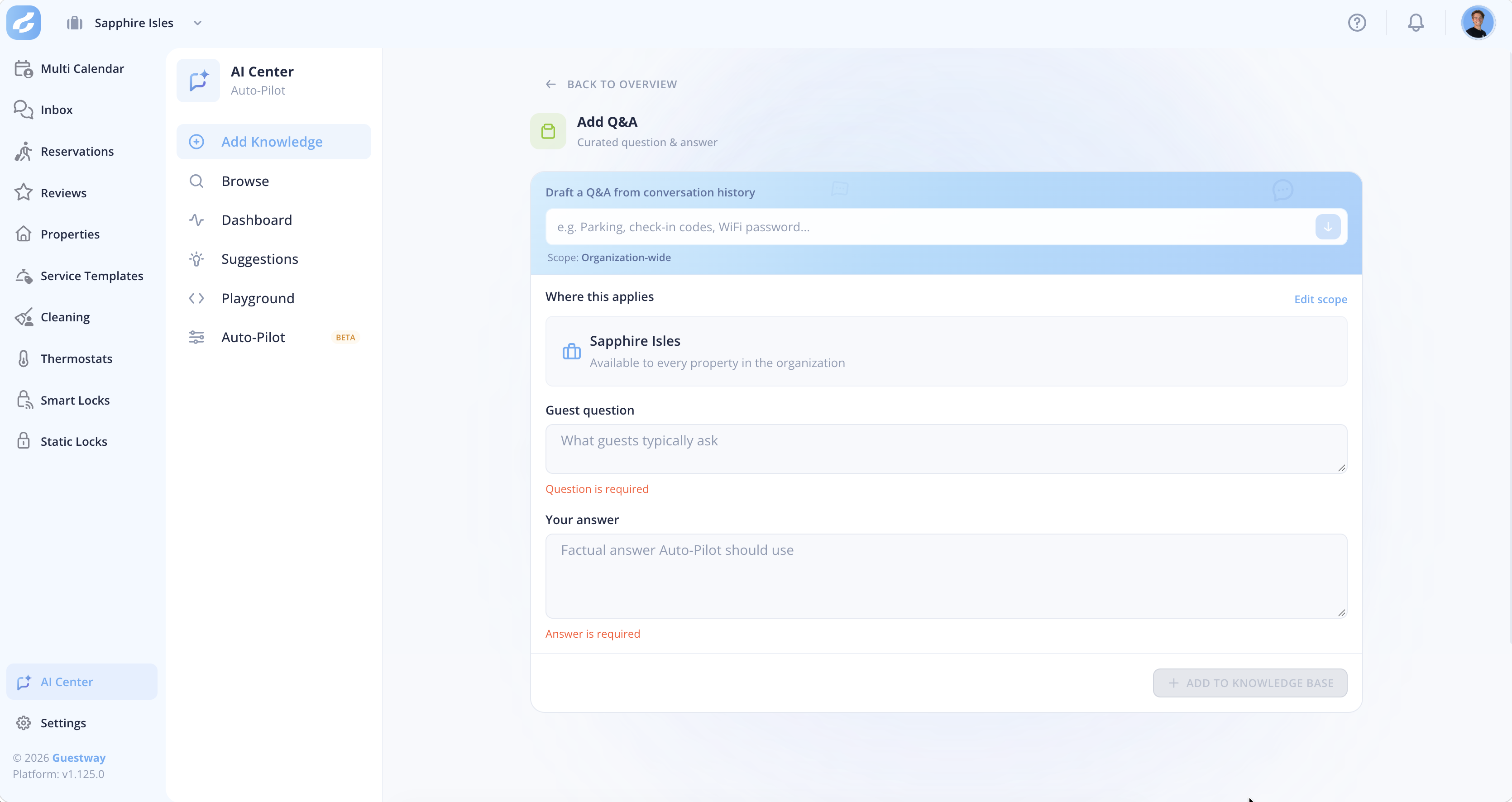
<figure><img src="https://content.gitbook.com/content/kBDBFX4VDrFqOnghyBKx/blobs/zulVfcaAC92WuBL3Pz61/image.png" alt=""><figcaption><p>The Add Q&#x26;A page in the Add Knowledge tab.</p></figcaption></figure>

| Field                                      | What it does                                                                                                                                             | Limits                                                                           |
| ------------------------------------------ | -------------------------------------------------------------------------------------------------------------------------------------------------------- | -------------------------------------------------------------------------------- |
| **Draft a Q\&A from conversation history** | Fills in the question and the answer from how your team answered guests before, for a topic you type. Shows the conversations it found the knowledge in. | Needs enough past conversations about the topic, or it shows **No draft found**. |
| **Where this applies**                     | The properties the answer is for. The AI uses it only for guests staying at these properties.                                                            | The default is the whole organization.                                           |
| **Guest question**                         | The question as a guest would ask it.                                                                                                                    | At most 200 characters.                                                          |
| **Your answer**                            | The answer the AI gives.                                                                                                                                 | At most 4,000 characters.                                                        |

### Saved reply

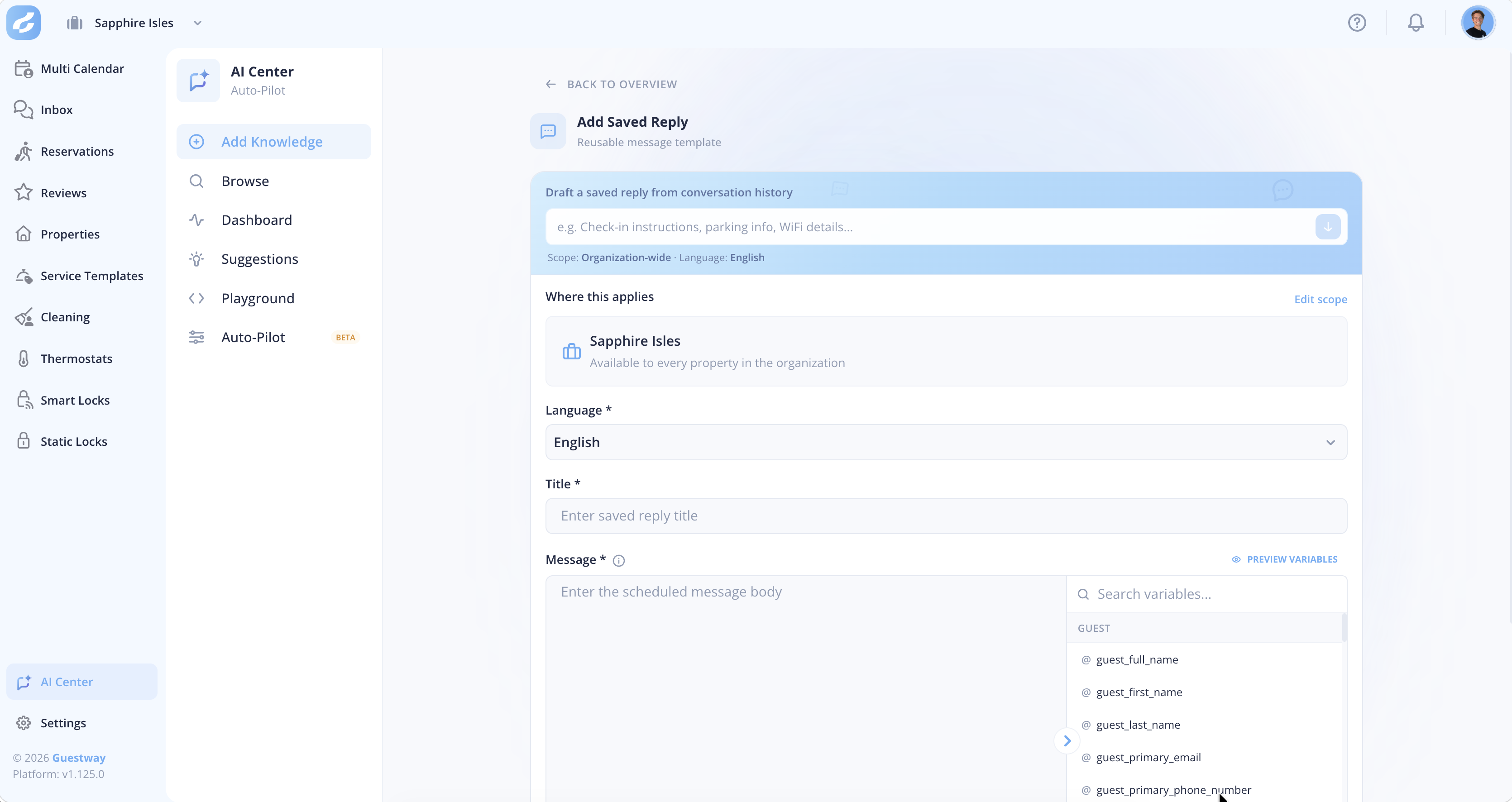
<figure><img src="https://content.gitbook.com/content/kBDBFX4VDrFqOnghyBKx/blobs/xIfN8j25rZq4uVSDxiF9/image.png" alt=""><figcaption><p>The Add Saved Reply page in the Add Knowledge tab.</p></figcaption></figure>

| Field                                      | What it does                                                                                                                                                                             | Limits                                           |
| ------------------------------------------ | ---------------------------------------------------------------------------------------------------------------------------------------------------------------------------------------- | ------------------------------------------------ |
| **Draft a Q\&A from conversation history** | Fills in the content from how your team answered guests before, for a topic you type.                                                                                                    | Needs enough past conversations about the topic. |
| **Where this applies**                     | The properties the saved reply is for.                                                                                                                                                   | The default is the whole organization.           |
| **Language**                               | The language the saved reply is written in. With versions in several languages, the AI picks the one that fits the reply language.                                                       | Required.                                        |
| **Title**                                  | The name in the saved replies list.                                                                                                                                                      | Required. Guests do not see it.                  |
| **Message**                                | The text sent to the guest. `@`, or the list on the right, inserts placeholders such as the guest's name or the check-in time. **Preview variables** shows the message with real values. | None                                             |

### Guest guidebook and internal document

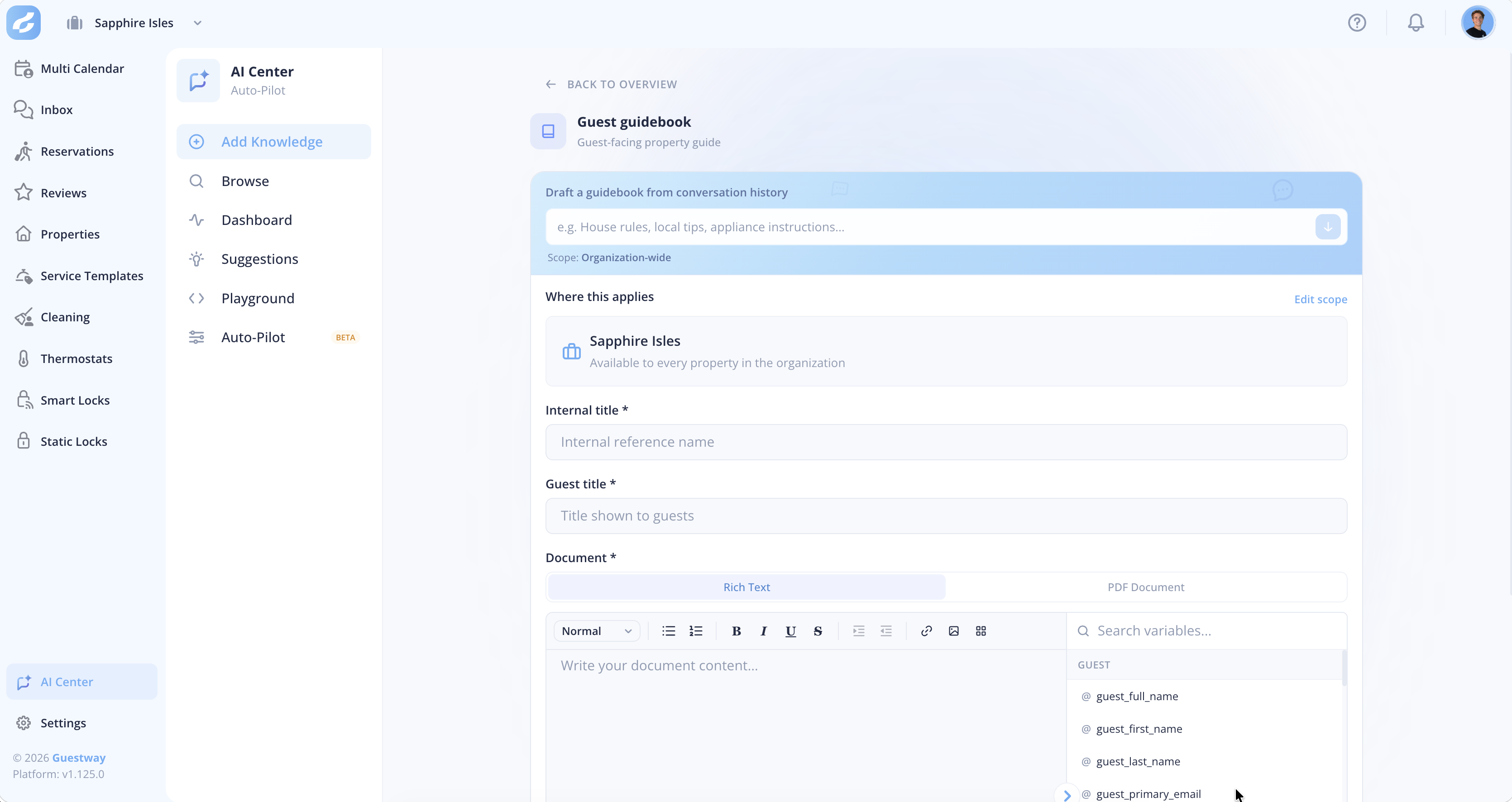
<figure><img src="https://content.gitbook.com/content/kBDBFX4VDrFqOnghyBKx/blobs/EDI4eEccUuMecBumZreI/image.png" alt=""><figcaption><p>The Add Guest guidebook page in the Add Knowledge tab.</p></figcaption></figure>

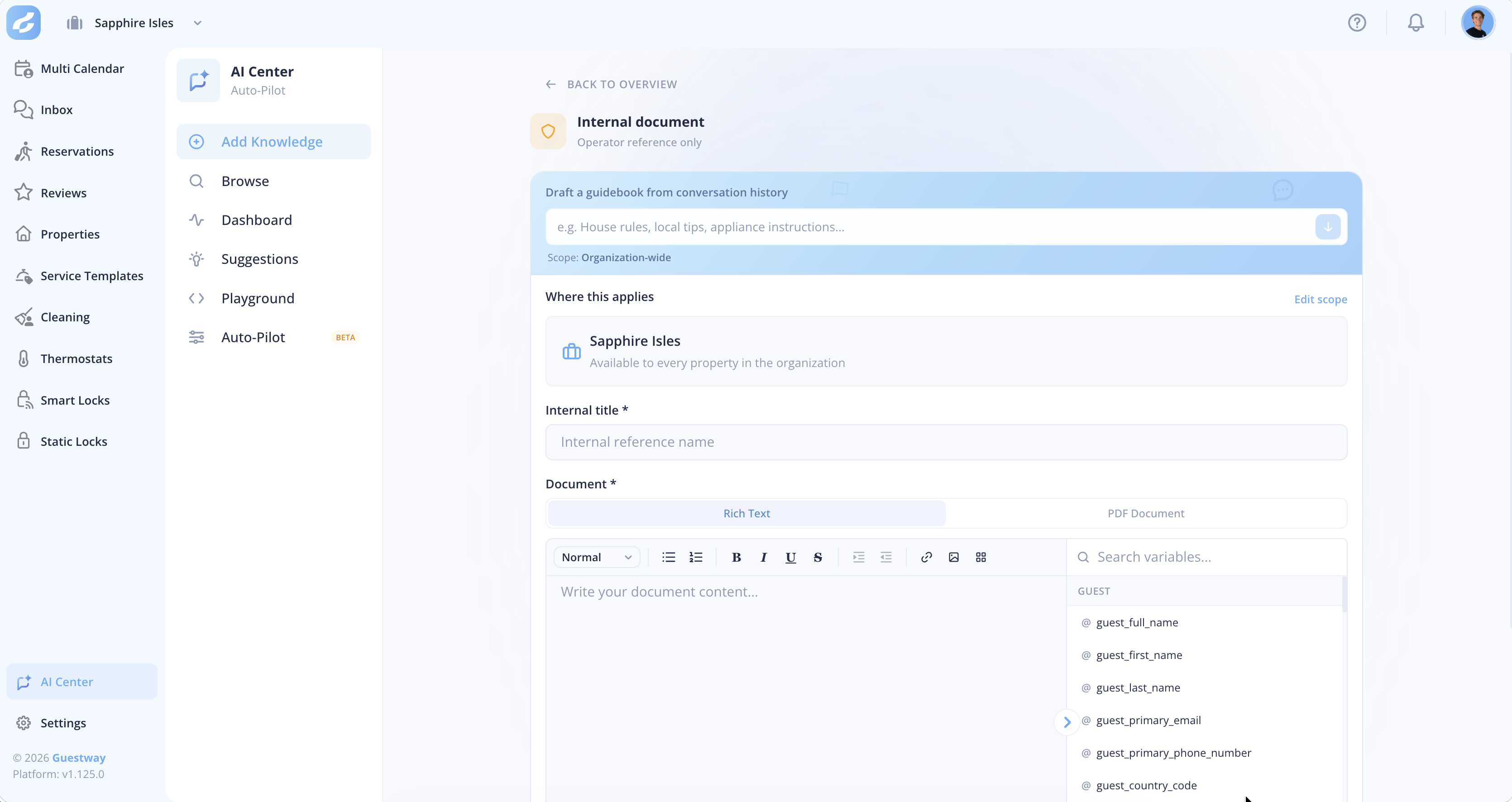
<figure><img src="https://content.gitbook.com/content/kBDBFX4VDrFqOnghyBKx/blobs/M1xCH2kf0OQqsS5Sd64X/image.png" alt=""><figcaption><p>The Internal document page in the Add Knowledge tab.</p></figcaption></figure>

| Field                                      | What it does                                                                                               | Limits                                           |
| ------------------------------------------ | ---------------------------------------------------------------------------------------------------------- | ------------------------------------------------ |
| **Where this applies**                     | The properties the document is for.                                                                        | The default is the whole organization.           |
| **Draft a Q\&A from conversation history** | Fills in the content from how your team answered guests before, for a topic you type.                      | Needs enough past conversations about the topic. |
| **Internal title**                         | The name your team sees.                                                                                   | With a PDF and no title, the file name is used.  |
| **Guest title**                            | The title guests see.                                                                                      | Required.                                        |
| **Document**                               | The content: **Rich Text** in the editor, with formatting, images and placeholders, or a **PDF Document**. | A PDF has at most 10 MB.                         |

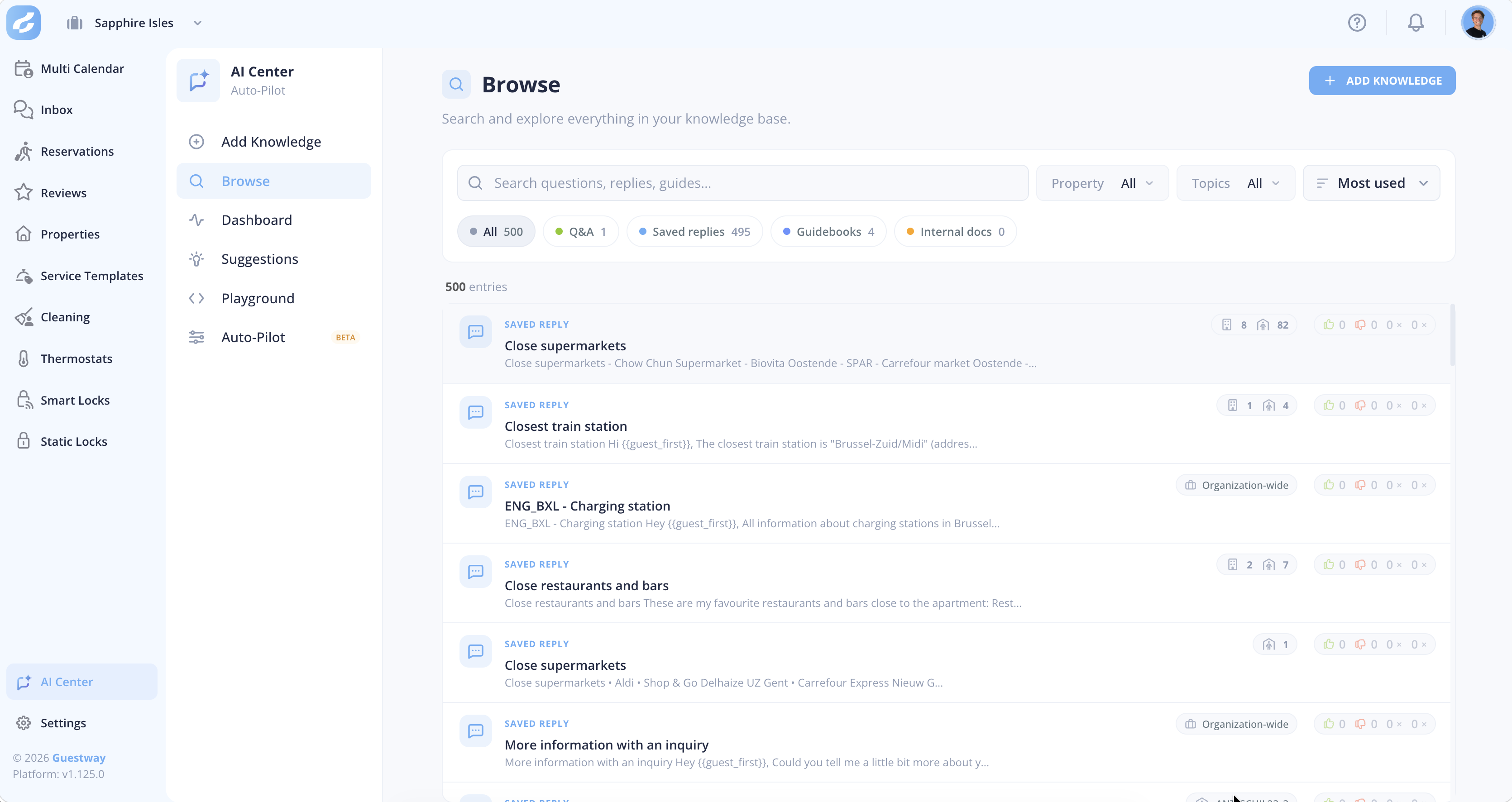
## Browse

<figure><img src="https://content.gitbook.com/content/kBDBFX4VDrFqOnghyBKx/blobs/4Bp3EWg86YTzpFQrVfXf/image.png" alt=""><figcaption><p>The Browse tab.</p></figcaption></figure>

| Field   | What it does                                                                                                           | Limits                        |
| ------- | ---------------------------------------------------------------------------------------------------------------------- | ----------------------------- |
| Tabs    | **All**, **Q\&A**, **Saved replies**, **Guidebooks** and **Internal docs**, each with a count.                         | None                          |
| Search  | Finds key words, titles and text in the content.                                                                       | None                          |
| Filters | Shows the entries of a property or a topic.                                                                            | None                          |
| Sort    | **Recently updated**, **Recently created**, **Most used**, **Most dismissed**, **Most upvotes** or **Most downvotes**. | The default is **Most used**. |

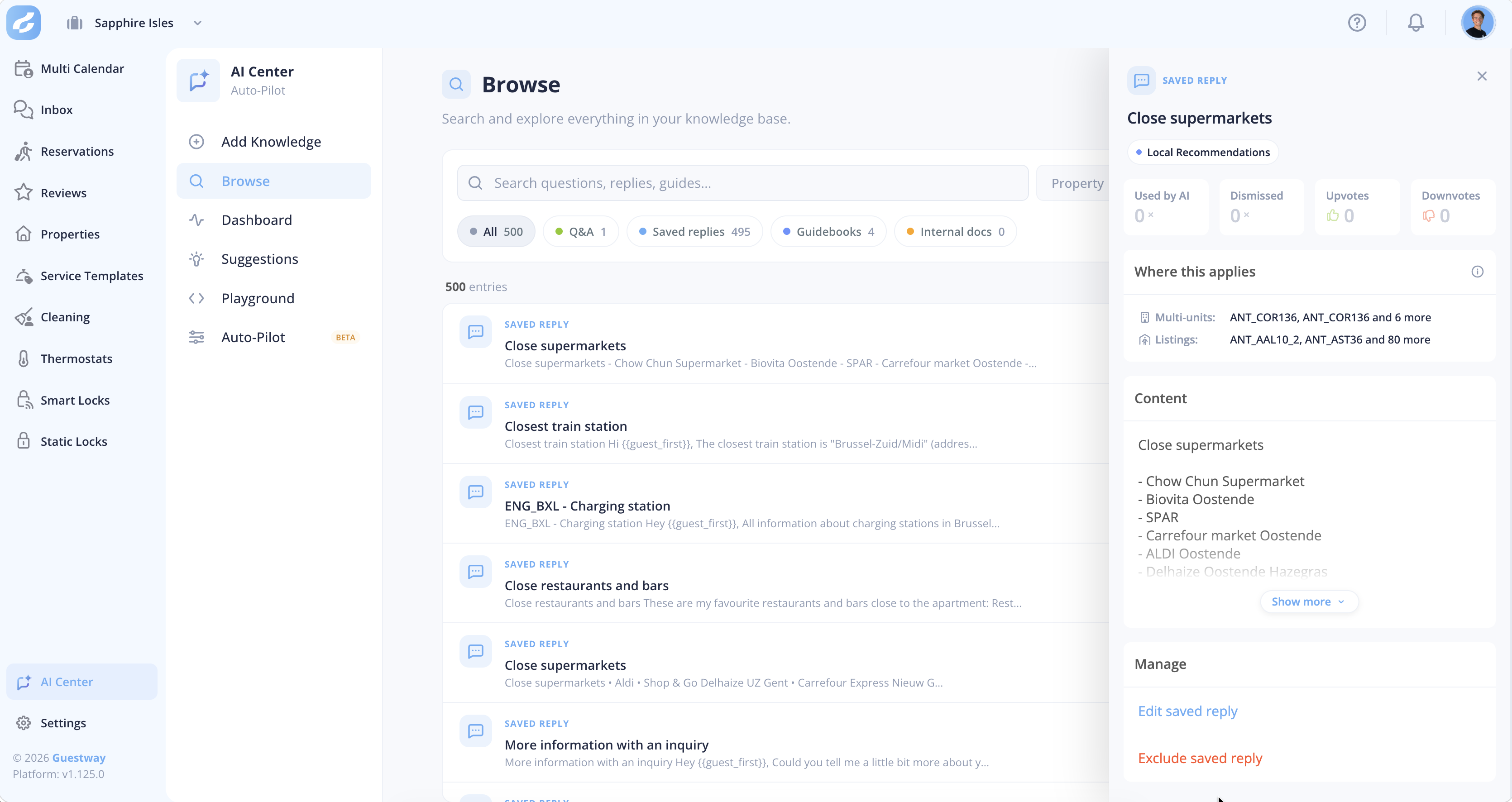
### Entry details

<figure><img src="https://content.gitbook.com/content/kBDBFX4VDrFqOnghyBKx/blobs/EgoWKTGaI9ylrEqC5x98/image.png" alt=""><figcaption><p>The detailed entry information in the Browse tab.</p></figcaption></figure>

| Counter        | What it counts                                                             |
| -------------- | -------------------------------------------------------------------------- |
| **Used by AI** | The AI used the entry, and your team sent the reply without correcting it. |
| **Dismissed**  | The AI used the entry, but your team ignored the suggestion.               |
| **Upvotes**    | Your team marked a reply based on the entry as helpful.                    |
| **Downvotes**  | Your team marked a reply based on the entry as not helpful.                |

The counters start again from zero when you edit an entry or change its scope.

| Setting                        | What it does                                                                                        | Limits                                                                                                         |
| ------------------------------ | --------------------------------------------------------------------------------------------------- | -------------------------------------------------------------------------------------------------------------- |
| Edit                           | Changes the content of the entry.                                                                   | Only Q\&As are edited in **Browse**. Saved replies, guidebooks and documents are edited where they were added. |
| **Edit scope**                 | Changes **Where this applies**.                                                                     | None                                                                                                           |
| **Remove from knowledge base** | Deletes the Q\&A.                                                                                   | Only for Q\&As.                                                                                                |
| **Exclude saved reply**        | Stops the AI from using the entry. The saved reply, guidebook or document itself stays where it is. | Only for saved replies, guidebooks and internal documents.                                                     |

After a change, the entry shows **Processing …**, then **Processed**. When processing is slow, it shows *Changes are taking longer than expected*.

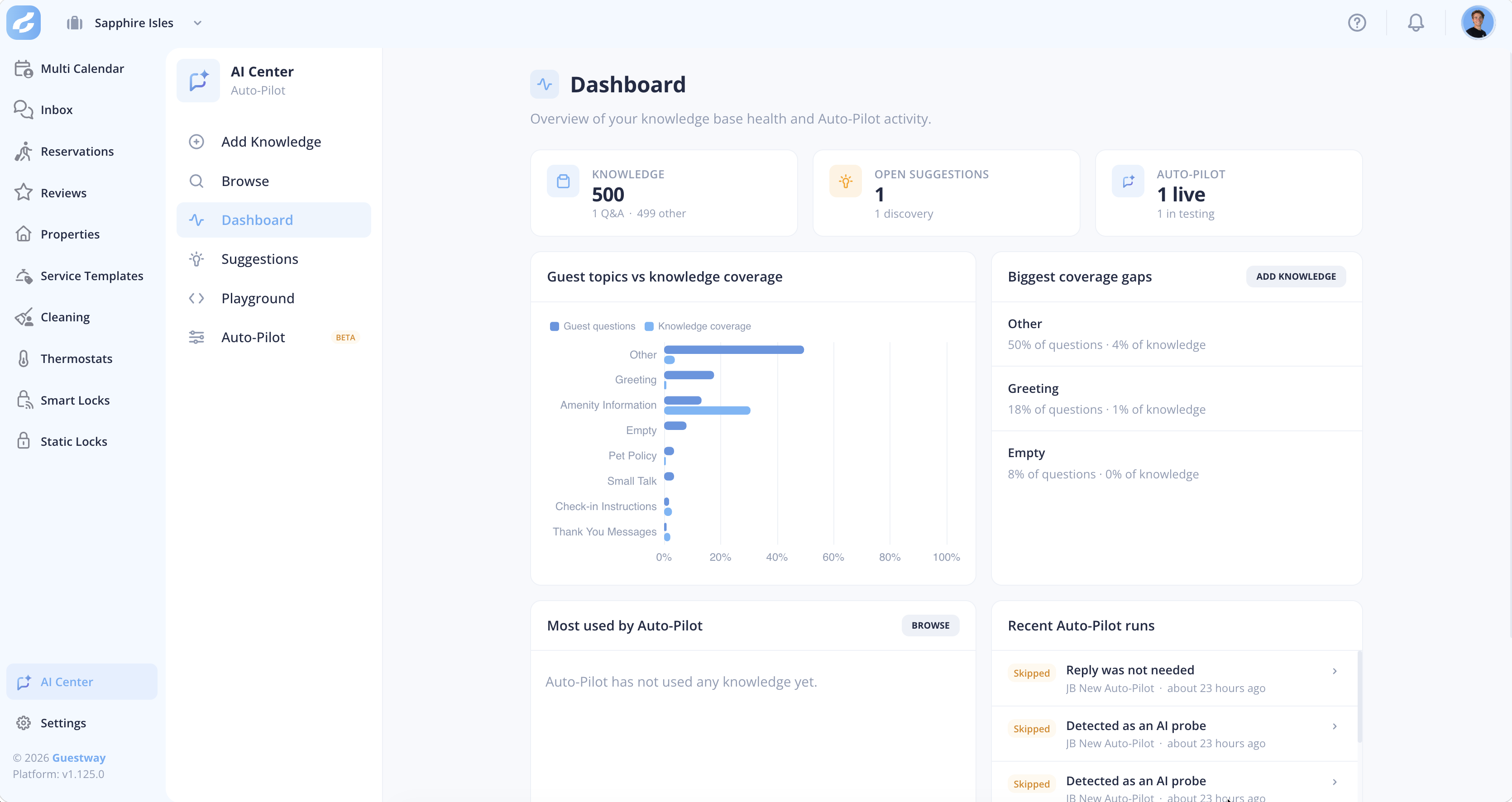
## Dashboard

<figure><img src="https://content.gitbook.com/content/kBDBFX4VDrFqOnghyBKx/blobs/unxvOkw4GoBBqVs3mUBE/image.png" alt=""><figcaption><p>The Dashboard tab.</p></figcaption></figure>

| Block                                  | What it shows                                                                                                                                                             |
| -------------------------------------- | ------------------------------------------------------------------------------------------------------------------------------------------------------------------------- |
| **Knowledge**                          | The number of entries, by type.                                                                                                                                           |
| **Open suggestions**                   | The number of knowledge gaps found by the AI that wait for review.                                                                                                        |
| **Auto-Pilot**                         | The number of Auto-Pilots that are live or in testing.                                                                                                                    |
| **Guest topics vs knowledge coverage** | What guests ask about, against what your knowledge covers.                                                                                                                |
| **Biggest coverage gaps**              | Topics that guests ask about a lot but your knowledge barely covers, for example 18% of questions but 2% of knowledge. **Add knowledge** opens the **Add Knowledge** tab. |
| **Most used by Auto-Pilot**            | The entries that Auto-Pilot uses most.                                                                                                                                    |
| **Recent Auto-Pilot runs**             | The latest Auto-Pilot runs.                                                                                                                                               |

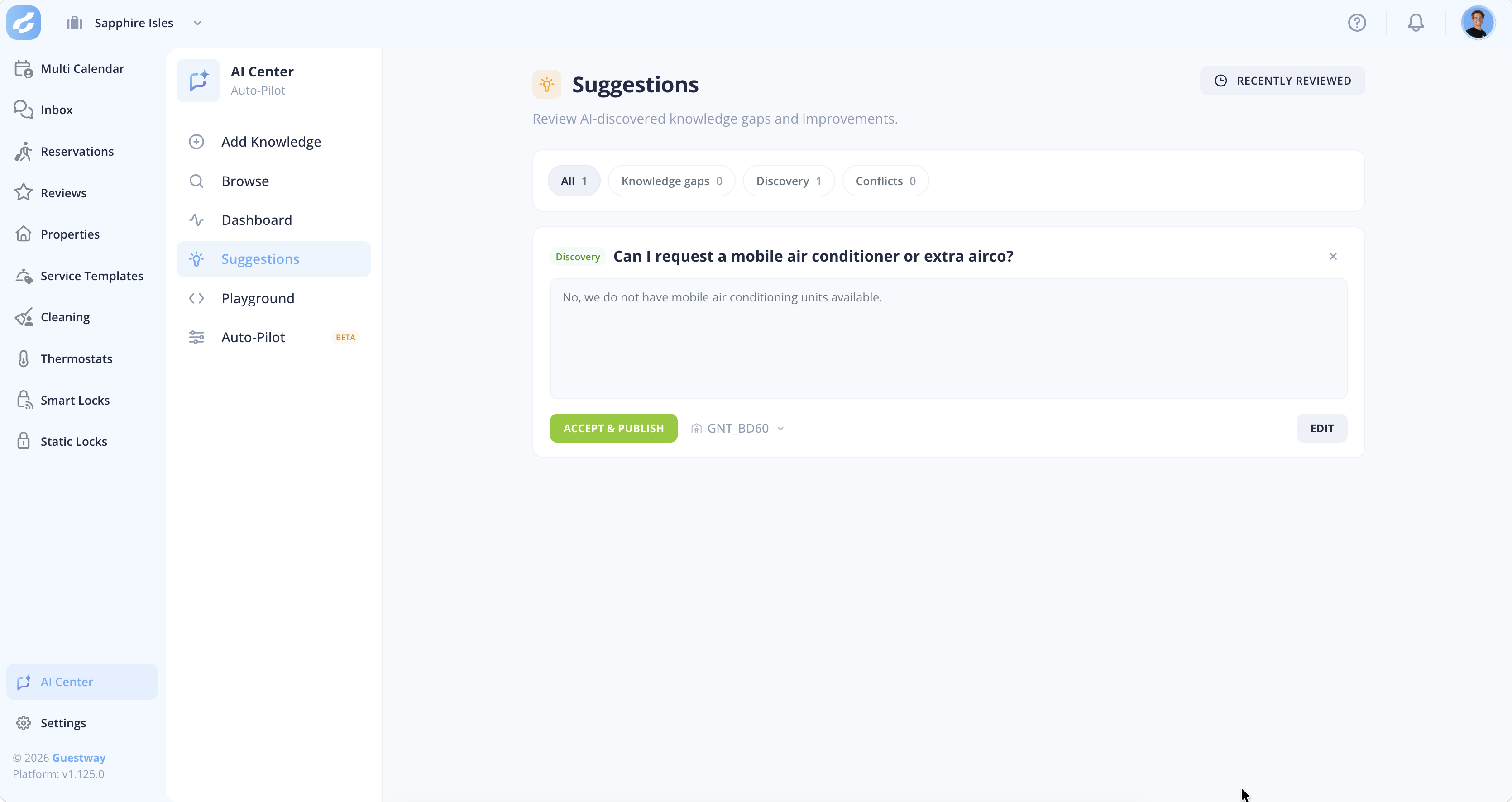
## Suggestions

<figure><img src="https://content.gitbook.com/content/kBDBFX4VDrFqOnghyBKx/blobs/baHeCIRPi2FR2fyMdEzY/image.png" alt=""><figcaption><p>The Suggestions tab.</p></figcaption></figure>

When the AI suggests a reply and your team sends something noticeably different, Guestway checks whether the team's reply has a reusable fact. If it has, the fact appears here as a proposed Q\&A. One-off answers and personal or sensitive details are filtered out.

| Kind               | What it is                                                  |
| ------------------ | ----------------------------------------------------------- |
| **Knowledge gaps** | A question the AI could not answer.                         |
| **Discovery**      | New knowledge from how your team answered.                  |
| **Conflicts**      | New information that contradicts an entry you already have. |

| Action               | What it does                                               | Limits                                                |
| -------------------- | ---------------------------------------------------------- | ----------------------------------------------------- |
| **Accept & publish** | Adds the suggestion as a Q\&A.                             | Accepting a conflict does not change the older entry. |
| Edit                 | Changes the suggestion and its scope before you accept it. | None                                                  |
| **Dismiss**          | Removes the suggestion.                                    | None                                                  |

An empty list shows *You're all caught up*.

## Playground

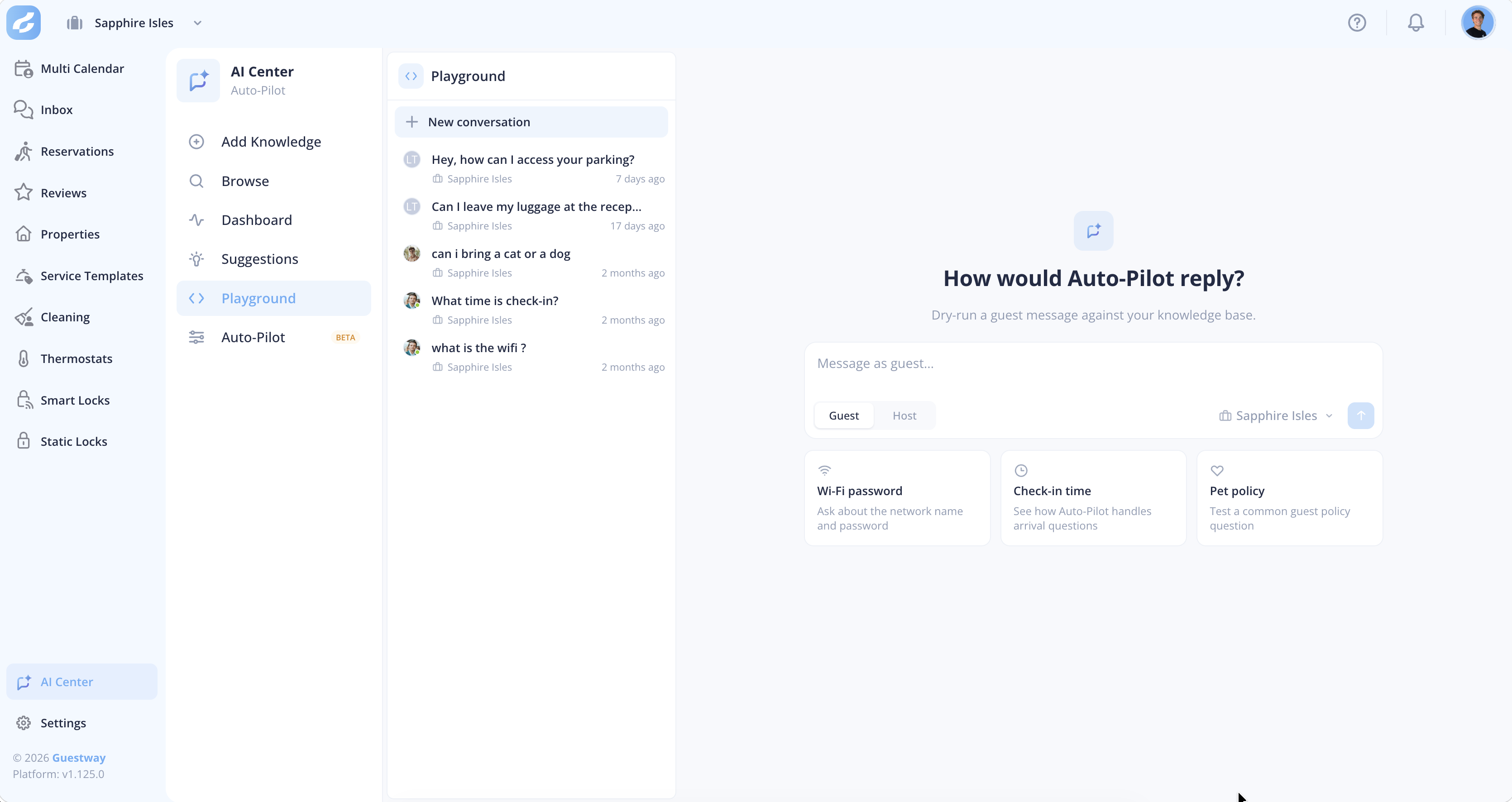
<figure><img src="https://content.gitbook.com/content/kBDBFX4VDrFqOnghyBKx/blobs/v5dmobzCJG69IBKkvV7u/image.png" alt=""><figcaption><p>The Playground tab.</p></figcaption></figure>

| Field                           | What it does                                                                                                  | Limits                                                            |
| ------------------------------- | ------------------------------------------------------------------------------------------------------------- | ----------------------------------------------------------------- |
| **New conversation**            | Starts a test conversation with the AI.                                                                       | Nothing is sent to a guest.                                       |
| **Conversation scope**          | What the conversation simulates: the whole organization, a complex, a multi-unit, a listing or a reservation. | Fixed for the conversation. A new scope needs a new conversation. |
| **Guest** / **Host**            | Sets who you write as. Each guest message gets an AI reply.                                                   | None                                                              |
| **Re-run Auto-Pilot from here** | Runs the AI again from a message.                                                                             | Later messages in the conversation are removed.                   |

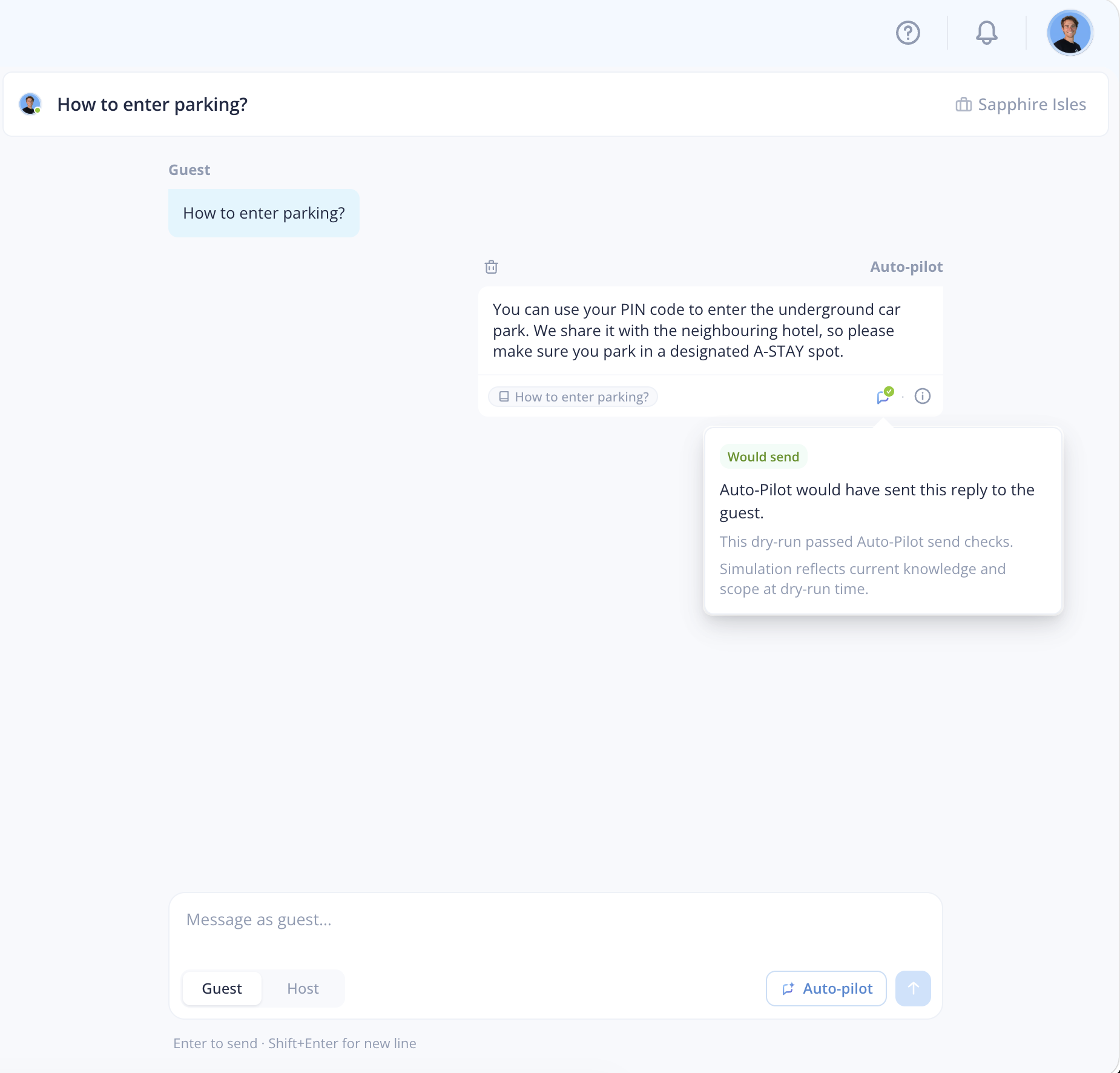
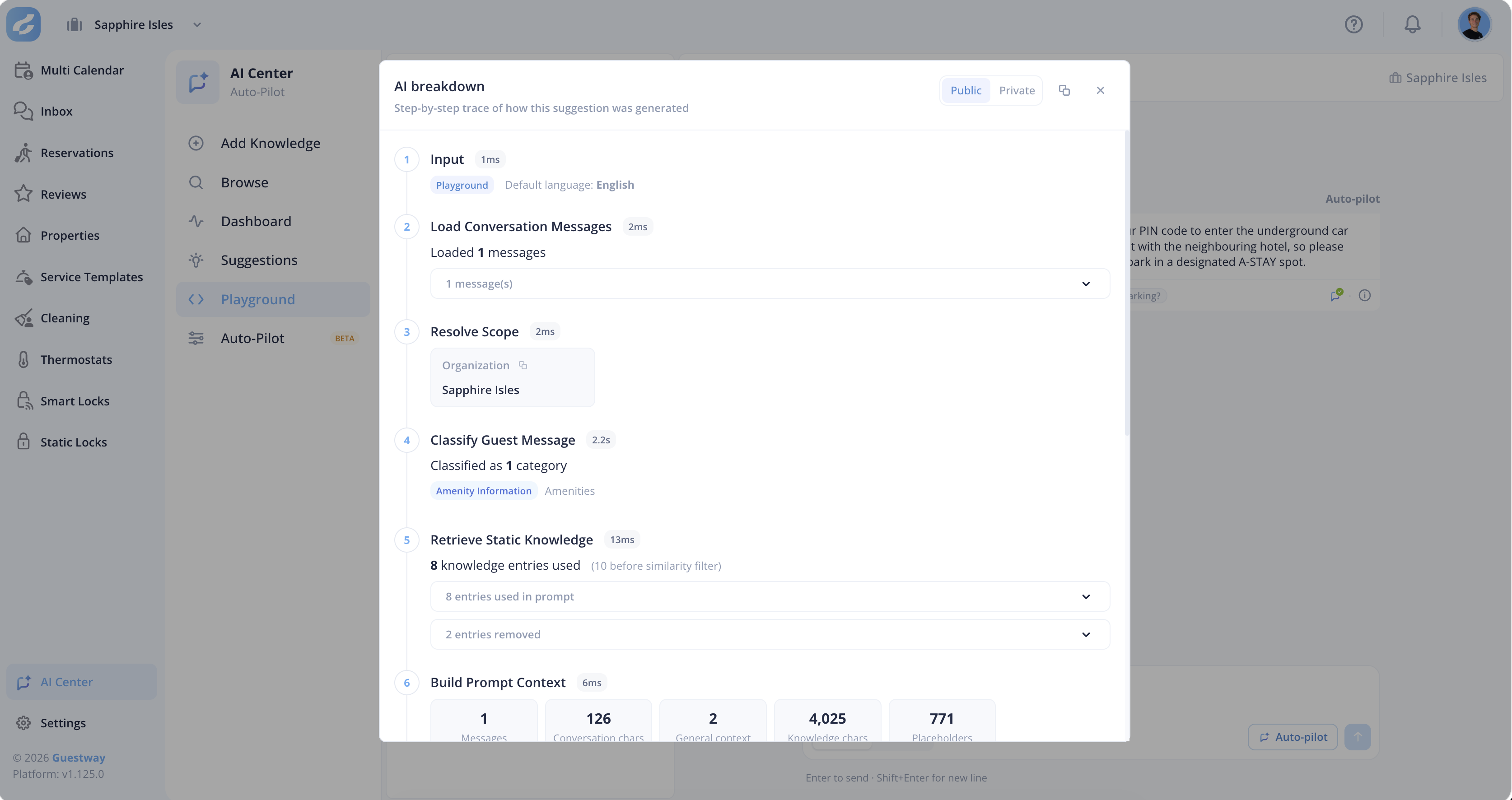
Each reply shows the knowledge it used, the fact-check result and the topics it detected. A **Would send** or **Would not send** label says whether Auto-Pilot would send it, with the reason when it would not.

<figure><img src="https://content.gitbook.com/content/kBDBFX4VDrFqOnghyBKx/blobs/daKemzIpHhCxljfymMd7/image.png" alt=""><figcaption><p>The Auto-pilot simulation results.</p></figcaption></figure>

<figure><img src="https://content.gitbook.com/content/kBDBFX4VDrFqOnghyBKx/blobs/eo48PUhP7aCl9o2xQ7jv/image.png" alt=""><figcaption><p>The "How was this built" insight for each simulation.</p></figcaption></figure>

Playground conversations are shared with your team. They are deleted after 90 days without activity.

## Auto-Pilot

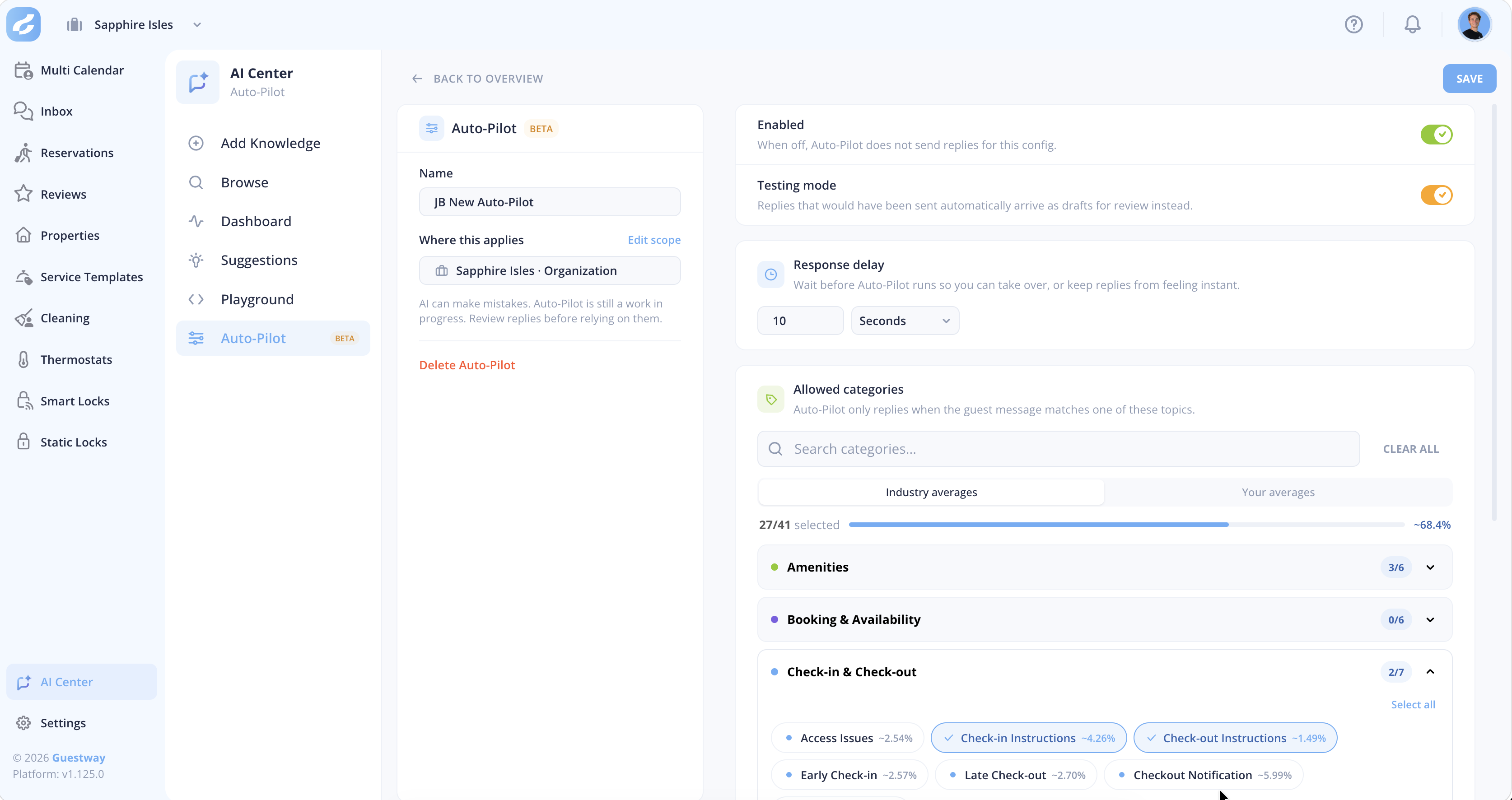
<figure><img src="https://content.gitbook.com/content/kBDBFX4VDrFqOnghyBKx/blobs/NWBQQUcE8UIOK7HcdI5E/image.png" alt=""><figcaption><p>The Auto-Pilot tab.</p></figcaption></figure>

Auto-Pilot answers guests on its own, in your name, on the channel the guest wrote on. You can have several Auto-Pilots, each with its own properties and topics. Each Auto-Pilot is a card with its status (**Enabled**, **Testing** or **Disabled**), its topics, its scope and its message coverage.

| Field                  | What it does                                                                                                                                                                                                                               | Limits                                                                      |
| ---------------------- | ------------------------------------------------------------------------------------------------------------------------------------------------------------------------------------------------------------------------------------------ | --------------------------------------------------------------------------- |
| **Name**               | The name of the Auto-Pilot.                                                                                                                                                                                                                | None                                                                        |
| **Where this applies** | The properties it answers for.                                                                                                                                                                                                             | None                                                                        |
| **Enabled**            | Turns the Auto-Pilot on or off. When off, it sends no replies.                                                                                                                                                                             | None                                                                        |
| **Testing mode**       | Replies arrive as drafts in the conversation for your team to review, instead of being sent.                                                                                                                                               | None                                                                        |
| **Response delay**     | How long Auto-Pilot waits before it replies. If a team member answers first, Auto-Pilot steps back. Several guest messages in a row get one answer.                                                                                        | From 10 seconds to 15 minutes.                                              |
| **Send threshold**     | How confident Auto-Pilot must be before it sends automatically, from **More caution** to **More automation**.                                                                                                                              | None                                                                        |
| **Allowed categories** | The guest topics Auto-Pilot may answer, grouped as **Check-in & Check-out**, **Amenities**, **Booking & Availability**, **Payments & Billing**, **Policies & Rules**, **Transportation & Logistics**, **Special Accommodations** and more. | A message that touches one topic that is not allowed is left for your team. |
| **Message coverage**   | Roughly what share of guest messages the chosen topics cover, based on industry averages or your own messages.                                                                                                                             | None                                                                        |

Auto-Pilot answers only new guest messages, only for properties in its scope and only on allowed topics. Its reply must also pass the fact check. Auto-Pilot can also be switched off in a single conversation.

## Reply language

| Reply                          | Language                                                                                                      |
| ------------------------------ | ------------------------------------------------------------------------------------------------------------- |
| Suggested replies in the inbox | The **AI Default Language** in your profile settings.                                                         |
| Auto-Pilot replies             | The AI language of your organization, English unless it was changed. Guestway support can check or change it. |

## Related

* [How to add knowledge to the AI](/ai/ai-center/how-to-add-knowledge-to-the-ai.md)
* [How to test answers in the playground](/ai/ai-center/how-to-test-answers-in-the-playground.md)
* [How to set up Auto-Pilot](/ai/ai-center/how-to-set-up-auto-pilot.md)
* [About how the AI answers guests](/ai/ai-center/about-how-the-ai-answers-guests.md)
* [Analytics](/reviews-and-analytics/analytics.md): the **Auto-Pilot** tab shows how Auto-Pilot performs over time.


---

# Agent Instructions
This documentation is published with GitBook. GitBook is the documentation platform designed so that both humans and AI agents can read, navigate, and reason over technical content effectively. Learn more at gitbook.com.

## Querying This Documentation
If you need additional information that is not directly available in this page, you can query the documentation by asking a question.

Perform an HTTP GET request on the following URL with the `ask` and `goal` query parameters:

```
GET https://docs.guestway.io/ai/ai-center.md?ask=<question>&goal=<user_goal>
```

`ask` is the immediate question: it should be specific, self-contained, and written in natural language.
`goal` is what the user is ultimately trying to achieve, the reason they need the answer. Sharing it helps GitBook give you a better, more relevant answer. A goal is most helpful when it describes the outcome the user wants rather than restating the question. For example, with `ask=how do I create an API token`, a goal like `automate deployments from our CI pipeline` lets GitBook tailor the answer to that use case.

The response will contain a direct answer to the question and relevant excerpts and sources from the documentation.

Use this mechanism when the answer is not explicitly present in the current page, you need clarification or additional context, or you want to retrieve related documentation sections.