
Branding
A branding profile sets the company details, colors, logos, emails and domain that guests see for the properties it is assigned to.
Overview
Branding is in Settings → Organization → Branding. A branding profile bundles your company details, colors, logos, email signature, email templates and social links into one configuration. The profile applies to:
Guest Portal: the web app guests open during their stay.
Main email communications: system messages sent from Guestway on your behalf.
Email footers: the signature block at the bottom of every outgoing message.
You can create more than one profile and assign each profile to different properties, for example one profile for each brand or sub-brand.
Create branding
Saves a new profile.
None
Default
The profile for every property without a specific profile.
A profile with linked listings or multi-units cannot become the default. Unlink them first.
Duplicate
Copies the profile, including the banner.
None
Delete
Deletes the profile.
None
The editor has the sections below, from top to bottom.
General information
Name
The name of the profile.
Required
Description
A note for your team, to tell profiles apart. Guests do not see it.
Optional
Show Guest Portal Links
Shows or hides the link to the Guest Portal in your emails to guests.
None
Override guest portal banner
Replaces the property image on the Guest Portal home screen with your own Banner image, for all linked properties.
The banner always replaces the property image, also when the property has photos.
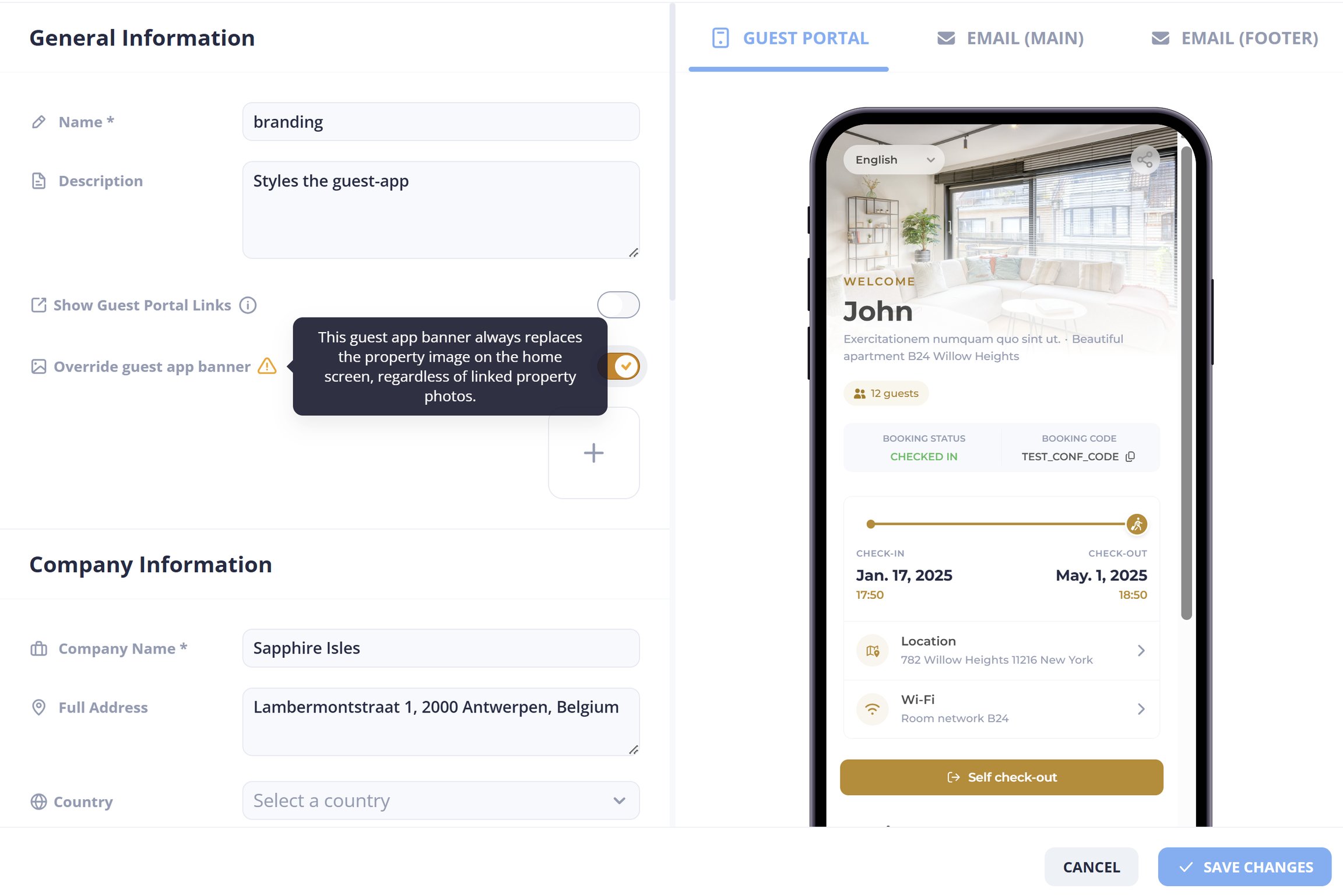
The banner can be replaced at any time with a new file. The banner crops differently on phones and on desktops, so text in the image can be cut off on small screens.
Company information
Guests see these details in the Guest Portal and in your emails. All fields are required.
Company Name
The name of your company.
Full Address
The address of your company.
Country
The country of your company.
Website URL
Your website.
Contact Phone
The phone number guests call from the contact page of the Guest Portal.
Contact Email
The email address guests can write to.
Brand colors
Primary Color
The main color of the Guest Portal and of your emails.
Required. A color code such as #RRGGBB.
Secondary Color
The second color of the Guest Portal and of your emails.
Required. A color code such as #RRGGBB.
Brand logos
Main Logo
Your logo, used across the Guest Portal and your emails.
Horizontal Logo
A wide version of your logo, for places where the main logo does not fit.
Footer information
Signature
A short text in the footer of the Guest Portal and of every email sent from Guestway.
Custom email templates
Replace the default Guestway email layout with your own HTML. Each template has its own card. A card shows Custom when your own HTML is used, and Default when the Guestway layout is used.
Reservation emails
The layout of emails tied to a reservation. You see it in the Email - reservation tab of the preview.
Must contain {{messageBody}} at least once. At most 60,000 characters.
Inquiry emails
The layout of emails without a reservation. You see it in the Email - inquiry tab of the preview.
Must contain {{messageBody}} at least once. At most 60,000 characters. Reservation variables are not available.
{{messageBody}} is where Guestway puts the message itself. You can also use variables, for example guest, reservation and property details. Guestway fills them in when it sends the email.
Social media links
Optional. Links to your social media accounts. Guests can open them from the Guest Portal and your emails.
Receiving email
Receiving Email
The preferred email address for guests to send emails to.
You choose from the email addresses of your Inbox.
Custom domain
Custom Domain
The domain of the Guest Portal for the properties of this profile.
You choose from the portal domains of your organization. Without one, Guestway default is used. When a custom domain is no longer available, Guestway default is used.
Properties
Choose the Listings and Multi-Units that use this profile.
Related
Guest journey: protection needs a default branding with company name and contact email.
Domains: set up your domain so that your emails are branded too.
Guest portal: where guests see your branding.